
A Practical Guide to Technical SEO for GoHighLevel Websites
TL;DR
Agencies adopt GoGoHighLevel to centralize CRM, funnels, automation, and websites, improving speed, efficiency, and margins.
GoHighLevel offers flexible SEO configuration, allowing agencies to intentionally manage URLs, metadata, structured data, and canonical signals.
Routine page edits or funnel changes can impact URL structure or create multiple page versions without defined SEO governance.
Organic performance on GoHighLevel depends on disciplined technical SEO execution rather than automated platform guardrails.
Agencies that apply structured SEO governance can extend GoHighLevel from a conversion-focused system into a sustainable organic growth channel.
Introduction: GoHighLevel and SEO Performance
GoHighLevel makes it easier to run marketing from one place. Funnels, CRM, automation, and websites live inside a single system, which cuts down tool overload, speeds up execution, and improves how agencies operate day to day.
But efficiency alone doesn’t guarantee visibility. SEO issues can still emerge at the page level, even when everything appears fine on the surface.
Pages publish, funnels go live, traffic runs, yet search engines don’t always interpret those pages the way you expect.
Page experience and technical SEO structure now play a direct role in both rankings and AI overview, LLMs, citations, and conversions. Even small performance gains matter.
According to a study conducted by Deloitte, a 0.1-second improvement in loading speed increased conversions for retail brands by 8.4%.
How Technical SEO Works in GoHighLevel
GoHighLevel gives teams full freedom to build websites, pages, funnels, and campaigns quickly. That flexibility allows agencies to move fast, but it also means technical SEO elements are configured intentionally rather than enforced automatically.
In GoHighLevel, search performance depends on how well foundational SEO components are applied across pages. This includes URL structure, metadata, structured data, indexing rules, and page performance signals.
When these elements are set correctly, search engines and AI systems can accurately interpret site content, understand page relationships, and surface the right pages in organic results, AI overviews, LLM responses, and citations.
Technical SEO configuration provides the structure that allows GoHighLevel Website sites to run smoothly for search engines, supporting visibility, scalability, and long-term performance as funnels and pages evolve.
Is GoHighLevel Good for SEO? Understanding Default SEO Configuration
HighLevel is built to help agencies capture and convert demand efficiently. Funnels, automation, and CRM features are designed to turn existing traffic into leads and revenue.
To support organic growth alongside conversions, GoHighLevel websites benefit from professional SEO implementation. Rather than relying on automated enforcement, the platform gives agencies control over how technical SEO elements are applied.
When configured intentionally, this approach supports long-term visibility and scalability.
Why GoHighLevel Websites Benefit from Professional SEO Services
Technical Configuration: GoHighLevel allows manual control over URL structure, structured data, and canonical signals. Applying these elements consistently requires defined SEO workflows and expertise.
Sustainable Traffic Growth: Organic SEO complements paid campaigns by building a long-term traffic channel that continues to perform without ongoing ad spend.
AI Search Readiness: Modern search experiences, including AI-powered results, rely on clean structure and structured data to understand content. Clear technical signals improve how pages are interpreted and surfaced.
Competitive Positioning: Many GoHighLevel users focus primarily on paid acquisition. Agencies that layer in SEO gain additional visibility and can compete in organic results alongside funnel-driven growth.
Our GoHighLevel Technical SEO Audit Findings
Over the past several weeks, our team of white label SEO experts audited live GoHighLevel websites spanning service businesses, ecommerce-adjacent brands, and local companies.
We conducted technical crawls, reviewed Google Search Console data, analyzed index coverage, and assessed how these sites are interpreted by modern search and AI systems.
A consistent pattern emerged from this analysis: GoHighLevel sites managed with clear processes and technical governance tend to perform more reliably in organic search than sites without structured SEO workflows.
This guide explains why these differences appear, and agencies should understand them before offering SEO and AI SEO services for GoHighLevel websites to clients.
If this reflects what you’re seeing across client accounts, structured GoHighLevel SEO support can help bring consistency and long-term stability to organic performance.
1. Managing URL Structure in GoHighLevel (And How to Do It Correctly)
GoHighLevel gives teams flexibility to build and update pages quickly. Because URL paths are editable, they require intentional oversight to remain stable over time.
By default, the URL path is connected to the page name. When a page title is updated – for example, changing “Home Services” to “Home Roofing Services” – the URL can change unless a custom path is set.
This matters because search engines treat each URL as a unique page. If a URL changes without a redirect, previously earned authority and links are no longer associated with the new version.
Similarly, creating multiple versions of a page can result in numeric URL variations such as /service-1 or /service-2. While useful during setup, these variations should be consolidated before pages are indexed to avoid splitting ranking signals.
How to Manage URLs Correctly in GoHighLevel
Lock the URL Path: Set a custom, keyword-focused URL path in the page or funnel settings before publishing. This keeps the URL stable even if the page name changes later.
Treat URLs as Permanent Assets: Once a page is live and indexed, avoid changing its URL unless necessary. If a change is required, apply a 301 redirect to guide search engines and users to the new location.
Use Nested URL Structures: Organize pages using logical paths to improve clarity and crawlability.
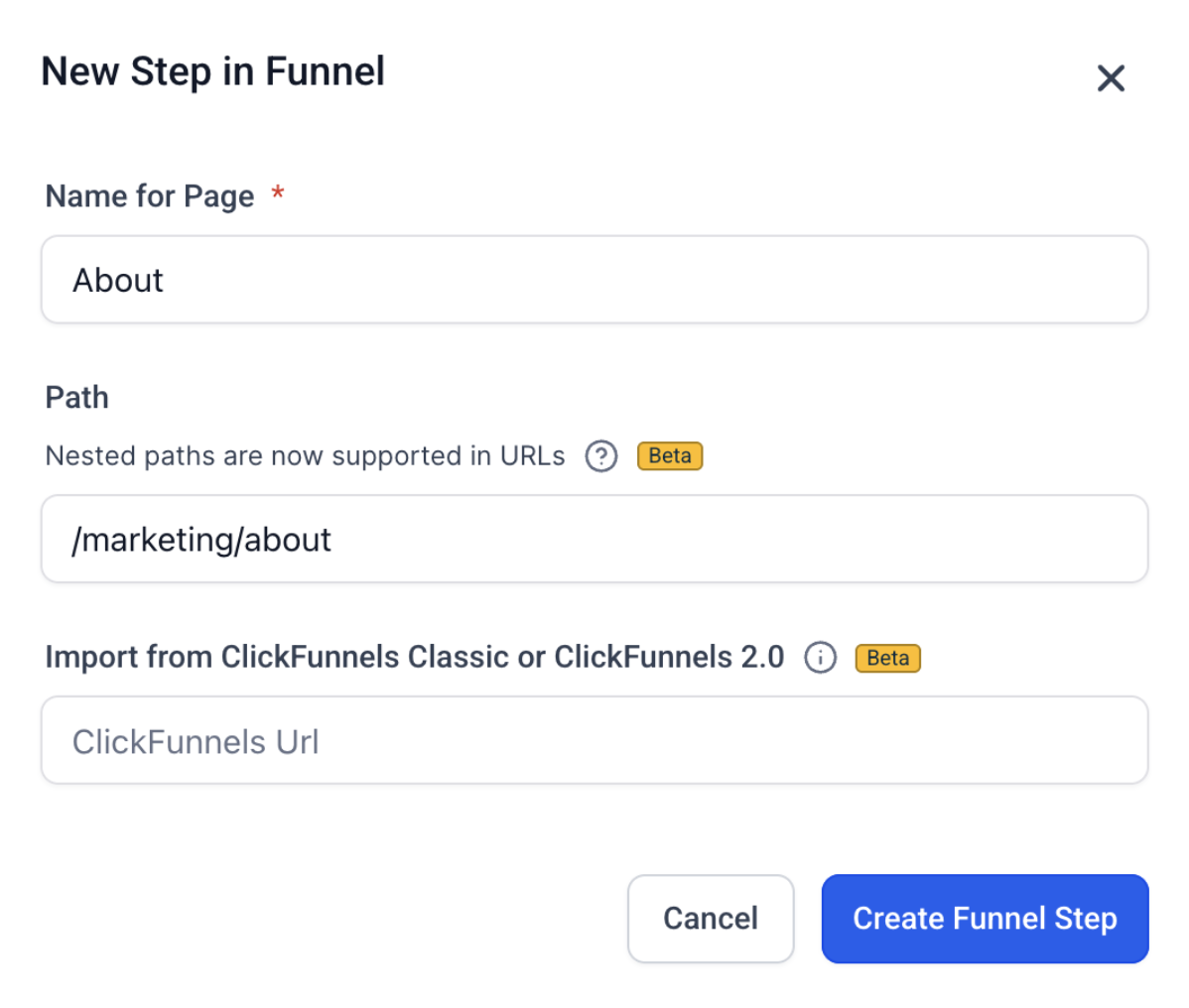
Example:
/resources/courses/ai-seo-class
/webinars/2026/summer-session
/campaigns/holiday/black-friday-offer
/funnels/product-launch/step-1
When URL structure is managed deliberately, HighLevel sites provide clear signals to search engines while allowing teams to update content freely without disrupting organic visibility.
2. How to Manage URL Stability and Sitemap Consistency in GoHighLevel
URL stability plays an important role in organic search performance. In GoHighLevel, URL paths are editable, which means teams should intentionally set and lock paths before pages are indexed.
If a custom path isn’t defined, the system may generate variations such as /home-1 when pages are duplicated or adjusted during setup. These variations are useful during development, but should be finalized before launch to keep URLs consistent.
Maintaining stable URLs helps search engines associate authority, links, and rankings with a single page over time.
Step-by-Step: Locking URL Paths in GoHighLevel
Open the Builder: Navigate to Sites > Funnels (or Websites) and select the funnel or site you want to edit.
Select the Page: Click the specific page or funnel step you want to configure.
Access Publishing Settings: In the step editor, click the Publishing tab at the top.
Set a Custom Path: Locate the Step Path field and enter a clean, keyword-focused URL (for example, best-seo-services). Click Update Step to save the path.
Handle URL Changes with Redirects: If a live URL needs to be changed, go to Settings > URL Redirects and map the old path to the new one. This ensures search engines and visitors are guided correctly.
HighLevel supports 301 redirects through domain settings, allowing teams to preserve authority and traffic when URLs are updated intentionally.
When URL paths are finalized early and redirects are used where needed, GoHighLevel sites maintain clean sitemap entries and consistent signals for search engines.
3. SEO Metadata Configuration in GoHighLevel
Metadata acts as the “billboard” for a page in search results. Titles and descriptions influence how pages appear in search and how often users click through.
GoHighLevel provides fields to enter SEO titles and meta descriptions, giving teams full control over how pages are presented to search engines. Because this process is manual, metadata should be applied intentionally as part of every page launch.
In SEO audits, it’s common to see default titles such as “Home – Page 1” or pages published without a meta description. While pages still load correctly, these defaults can limit click-through rates and reduce clarity for search engines.
Social sharing follows a similar pattern. When Open Graph and social preview settings are not configured, shared links may display generic titles or images, which can affect brand presentation across platforms.
Best Practice: Treat Metadata as Core Infrastructure
Every indexable page should have a unique, keyword-focused title
Meta descriptions should clearly explain the page and encourage clicks
Social preview settings should be defined to control how links appear when shared
Because metadata is configured manually, agencies benefit from using a simple checklist for every new page or funnel step. This ensures consistency across sites and helps maintain clear signals for search engines and social platforms alike.
How to Edit SEO Metadata in GoHighLevel
GoHighLevel allows teams to manually configure SEO metadata for each page, giving full control over how content appears in search results and on social platforms.
Because metadata is applied at the page level, it should be reviewed and updated as part of every page or funnel launch to ensure consistent search visibility.
Step-by-Step: Editing SEO Metadata in GoHighLevel
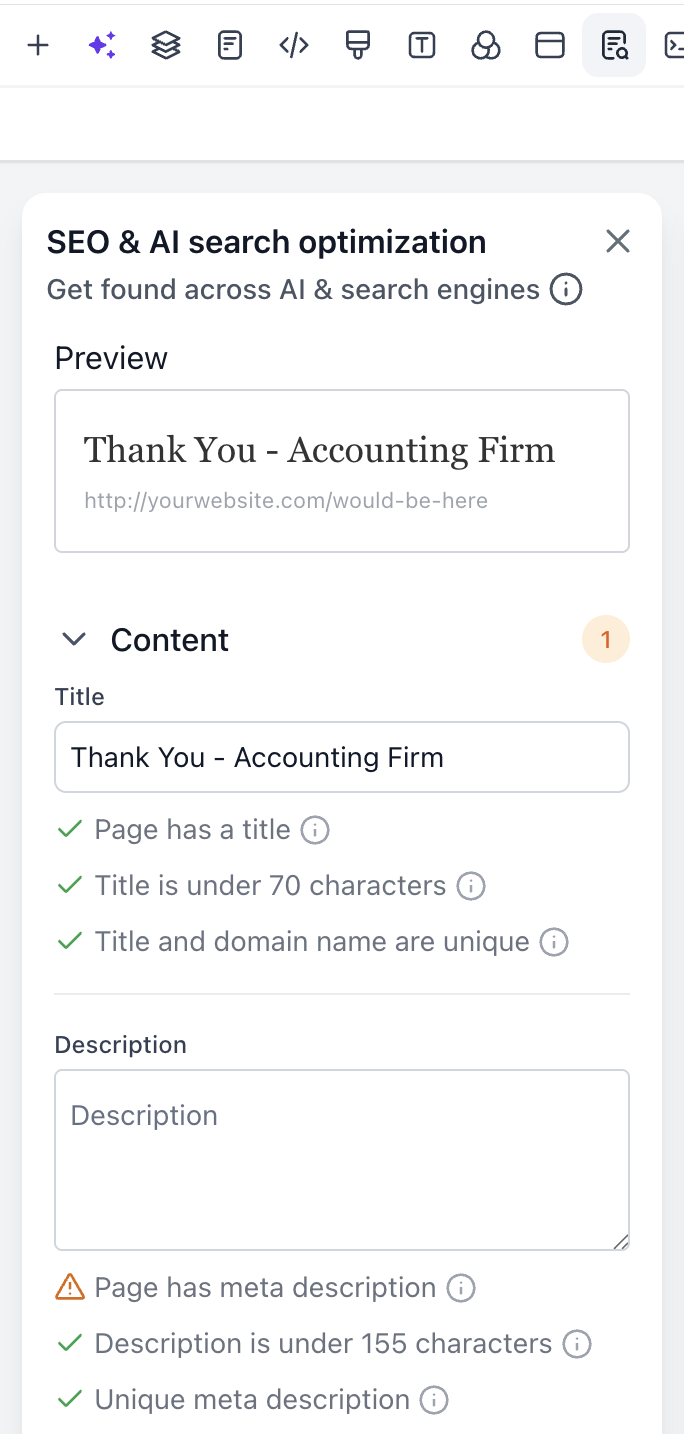
Enter the Editor: Open the page or funnel step in the GoHighLevel Page Builder.
Open SEO Settings: In the top menu bar, click Settings, then select SEO Meta Data.
Fill in the Fields
Title: Keep it under 70 characters and include the primary keyword naturally.
Description: Write a clear, compelling summary under 155 characters that encourages clicks.
Social Image: Upload a 1200 × 630 px image to control Open Graph previews on platforms like Facebook and LinkedIn.
Save Changes: Click Update SEO Meta, then Save the page to apply the updates.
Applying SEO metadata consistently helps search engines understand page relevance and ensures shared links display clean, branded previews across social platforms.
4. Structured Data in GoHighLevel (Manual and Create with AI Options)
How do you add schema markup to GoHighLevel? This is a common question from agencies offering SEO for GoHighLevel websites.
Schema, also known as structured data, helps search engines understand what a page represents, such as a business, service, location, FAQ, or review. Clear, structured data improves how content is interpreted in search results and AI-powered experiences.
GoHighLevel supports structured data through both manual schema mode and AI-assisted schema creation, giving agencies flexibility based on their workflow and scale.
Manual Schema Mode
Manual mode allows teams to add or customize JSON-LD directly. This is ideal when specific schema types or attributes are required, such as LocalBusiness, Service, or advanced FAQ markup.
This approach works well for:
Local SEO and Map Pack visibility
Service pages with defined offerings
Pages requiring custom attributes or advanced markup
Create with AI Schema Mode
AI-assisted schema tools help speed up structured data creation by generating valid JSON-LD automatically based on page content. This option is useful for agencies managing multiple pages or accounts and looking to reduce manual effort while maintaining consistency.
AI-generated schema helps:
Improve eligibility for rich search results
Support AI-powered search experiences
Reduce manual schema errors
Both approaches result in the same outcome: clearer signals for search engines and richer search appearances.
When structured data is applied, pages move beyond plain text and can appear with enhanced search features such as FAQs, business details, and rich results & AI citations.
How to Add Schema Markup to GoHighLevel
Step 1: Access the Tool
Navigate to your website builder → SEO & AEO Optimization → Schema Markup.
Step 2: Choose the Right Schema Type
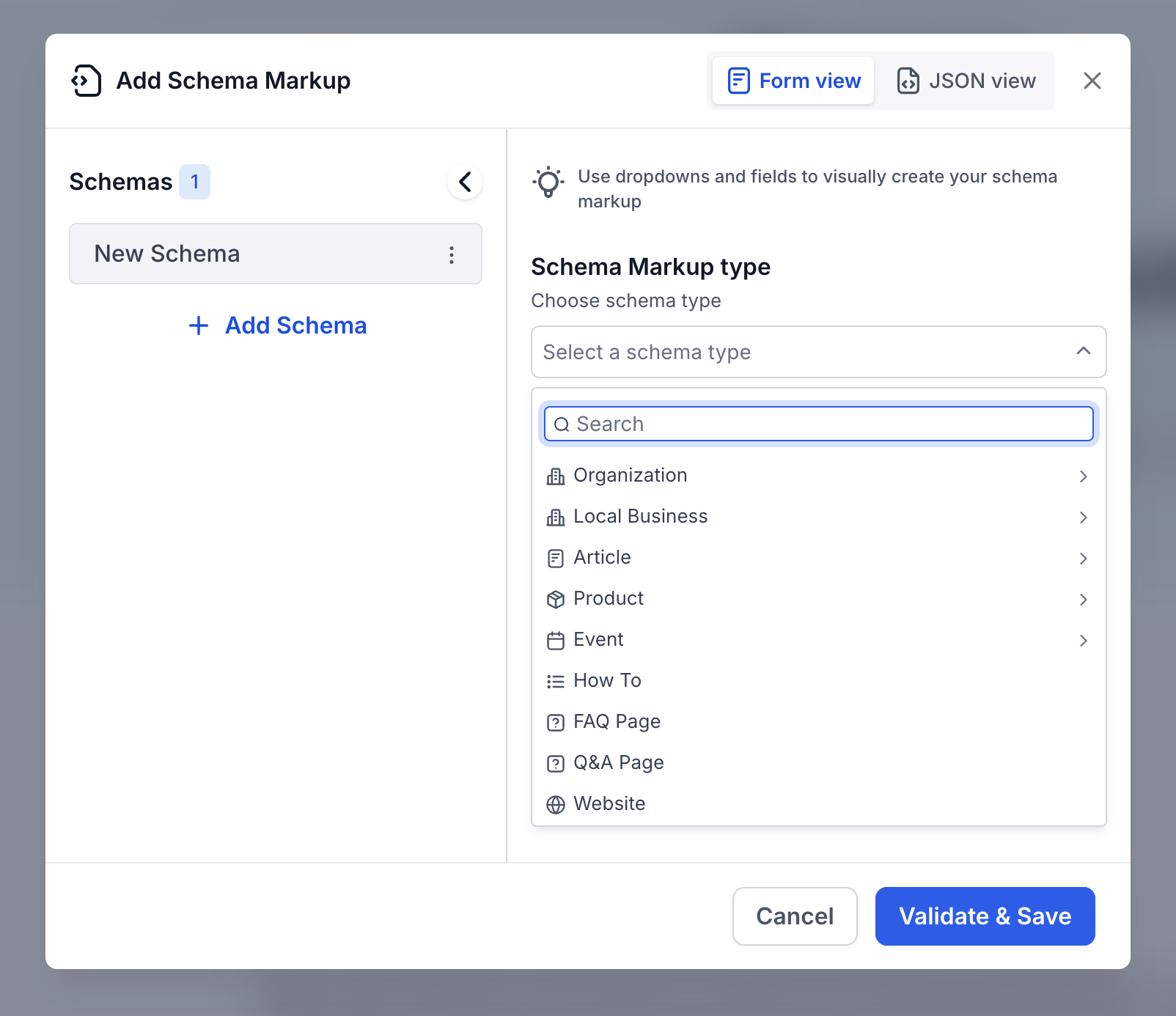
Select from 250+ available schema types based on the purpose of your page. Common options include:
Local Business – for businesses with physical locations
Service – for service-based offerings
Product – for e-commerce or product pages
Article – for blog posts and content pages
FAQ – for pages answering common customer questions
Each schema type includes a short description to help you select the most appropriate option for your page.
Step 3: Fill Out, Validate, and Publish
Complete the schema form fields. Required fields are marked with red asterisks, and the system validates entries as you type.
When all fields are validated successfully, click Validate & Save, then Publish the page. Once published, search engines and AI systems can discover the structured data over the following days or weeks.
Pro Tip
Start with your homepage and contact page. Adding Local Business schema with complete and accurate details often delivers the fastest and most noticeable impact on search visibility.
Applying structured data consistently helps search engines and AI systems better understand page intent, improving eligibility for rich results and improved visibility.
5. Authority and Canonical Tags
A canonical tag is a signal that tells search engines which version of a page should be treated as the primary source when similar or duplicate pages exist.
In GoHighLevel, blog posts, funnel steps, and page variations can result in multiple URLs with closely related content. When a canonical URL is not defined, search engines may evaluate each version independently.
This can dilute authority across pages and reduce ranking clarity. Defining a canonical URL helps consolidate signals such as links and relevance into a single, authoritative page.
Best Practice: Define Canonical URLs for Key Pages
For every high-value page, set a canonical URL in the SEO Meta Data settings. This ensures search engines consistently attribute authority to the preferred page version and interpret the site structure correctly.
How to Set Canonical Tags in GoHighLevel
Step-by-Step (Websites & Funnels)
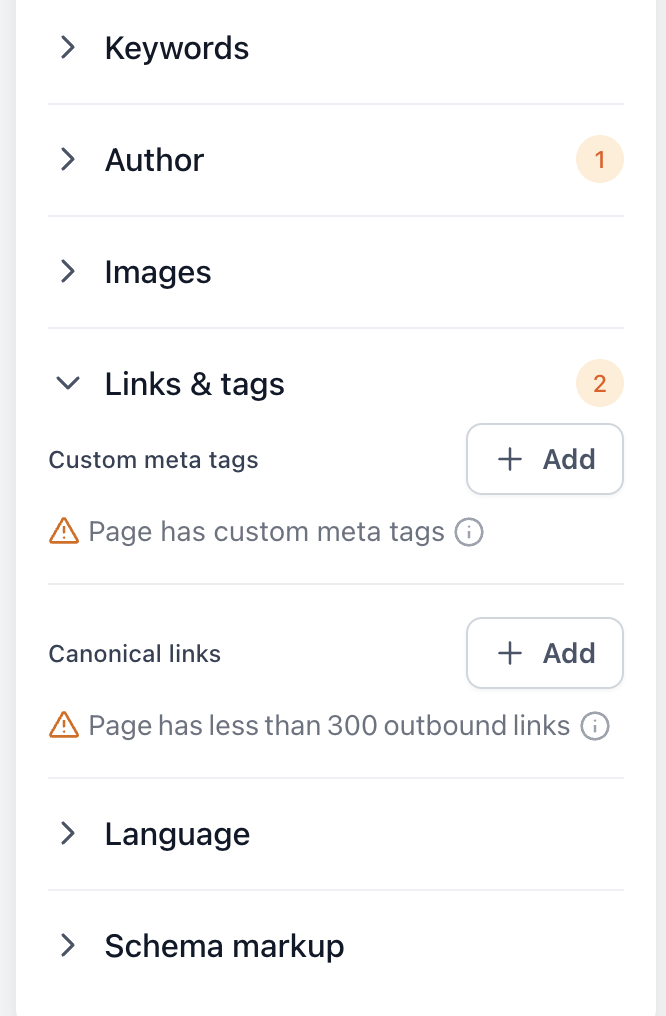
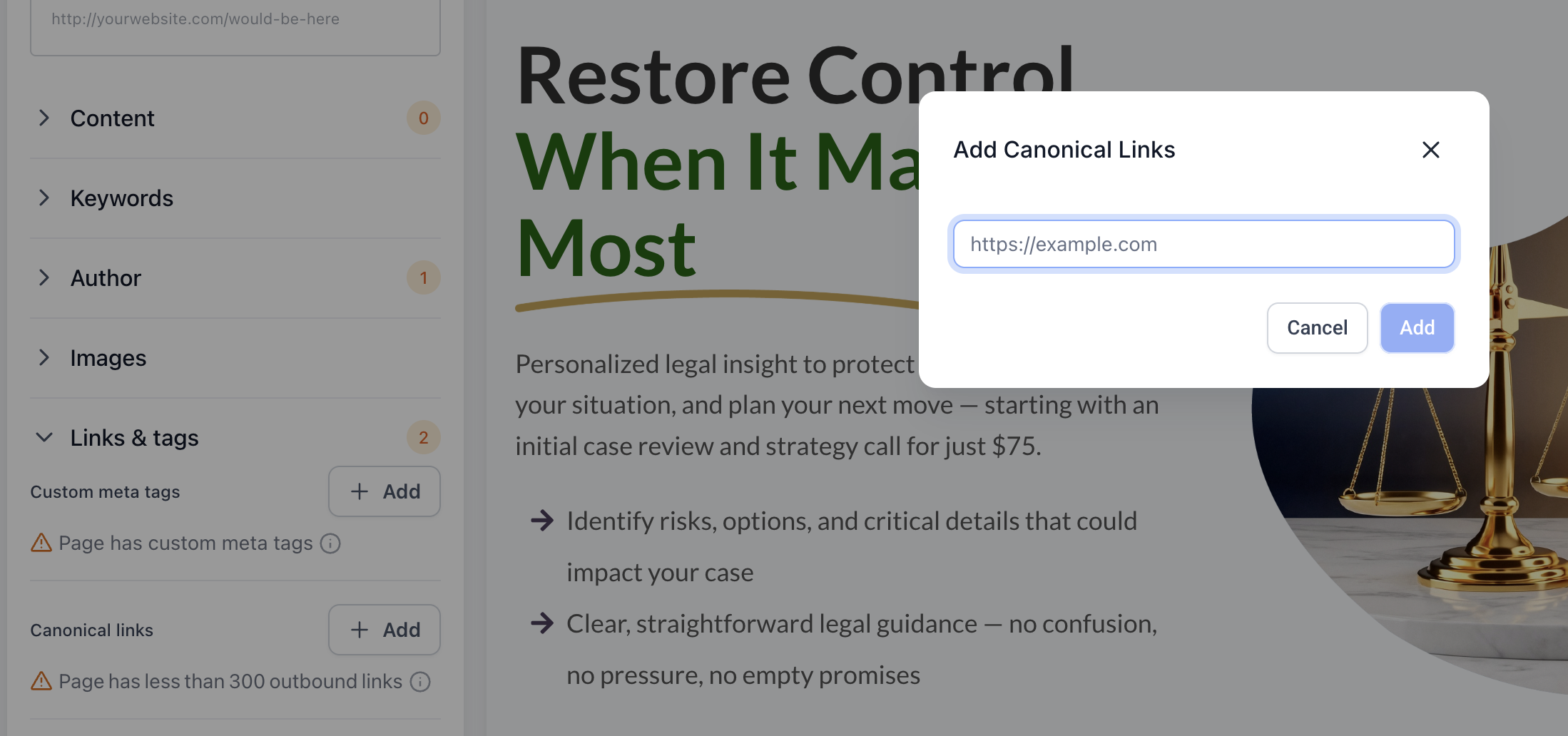
Open the SEO Meta Data settings for the page.
Scroll to the bottom of the panel to locate the Canonical Link field.
Paste the full preferred URL, including https://.
Save the changes and publish the page.
For Pages
For Blog Posts
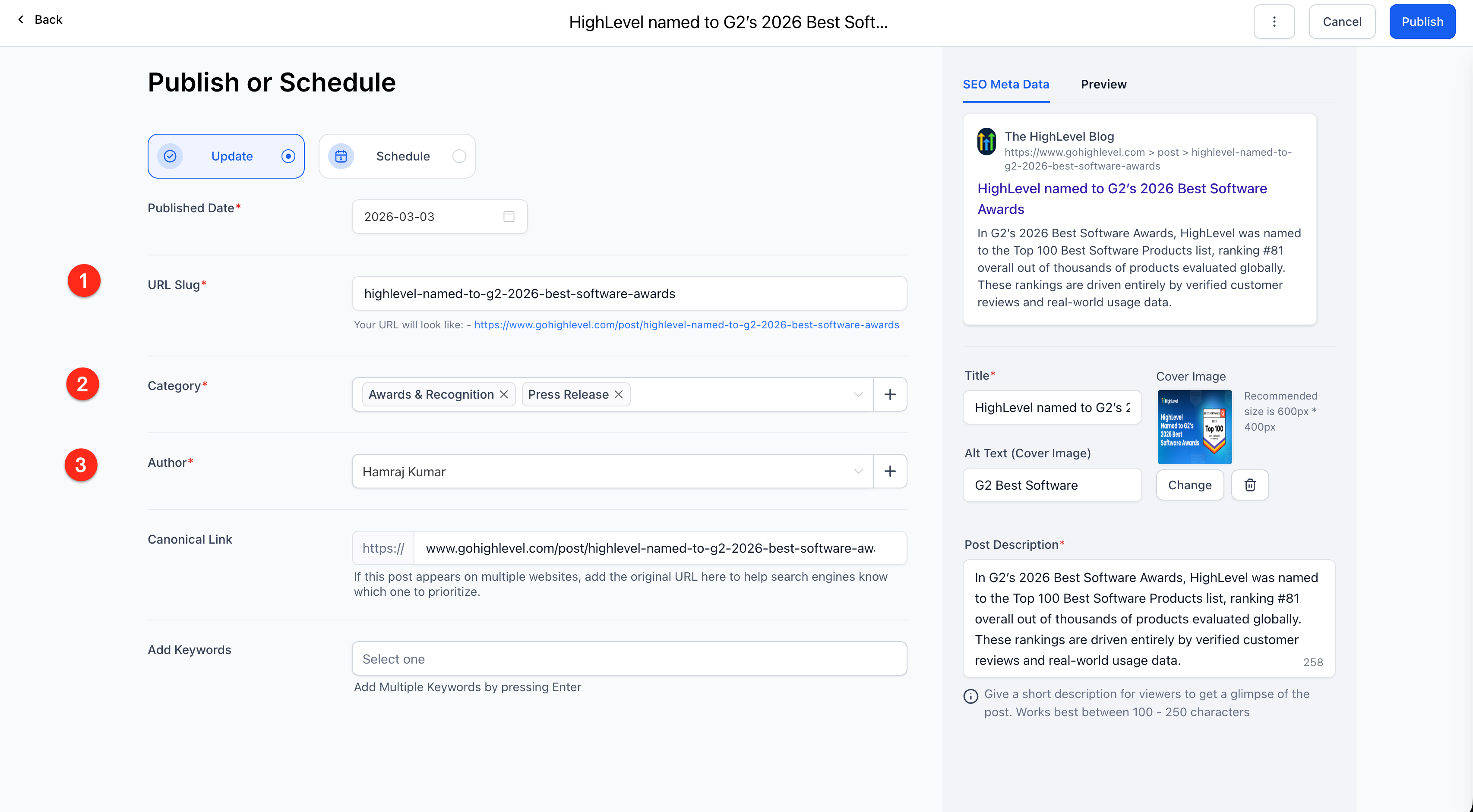
Navigate to Sites > Blogs.
Click the three-dot menu next to the post.
Select Canonical Links.
Set the authoritative source URL and save.
Applying canonical tags consistently helps search engines understand page relationships and supports stronger, more focused organic visibility across GoHighLevel sites.
6. Optimized XML Sitemaps in GoHighLevel
GoHighLevel automatically generates an XML sitemap to help search engines discover site pages. To support strong SEO performance, this sitemap benefits from intentional curation.
By default, sitemaps may include pages such as:
Internal thank-you pages
Form confirmation steps
Utility or policy pages that are not intended to rank
When a sitemap contains many non-essential URLs, search engines may spend time crawling pages that don’t contribute to organic visibility. This can reduce focus on high-value pages like core services, locations, or key content.
A well-organized sitemap acts as a clear roadmap for search engines, highlighting the pages that matter most for rankings and revenue.
To achieve this, agencies should intentionally decide which pages are included in the sitemap and which are excluded from indexing. This approach helps search engines prioritize important content and supports more consistent organic performance.
How to Configure XML Sitemaps in GoHighLevel
XML sitemap settings in GoHighLevel are managed at the domain level, allowing teams to control how search engines discover and crawl site content.
Step-by-Step: Managing XML Sitemaps
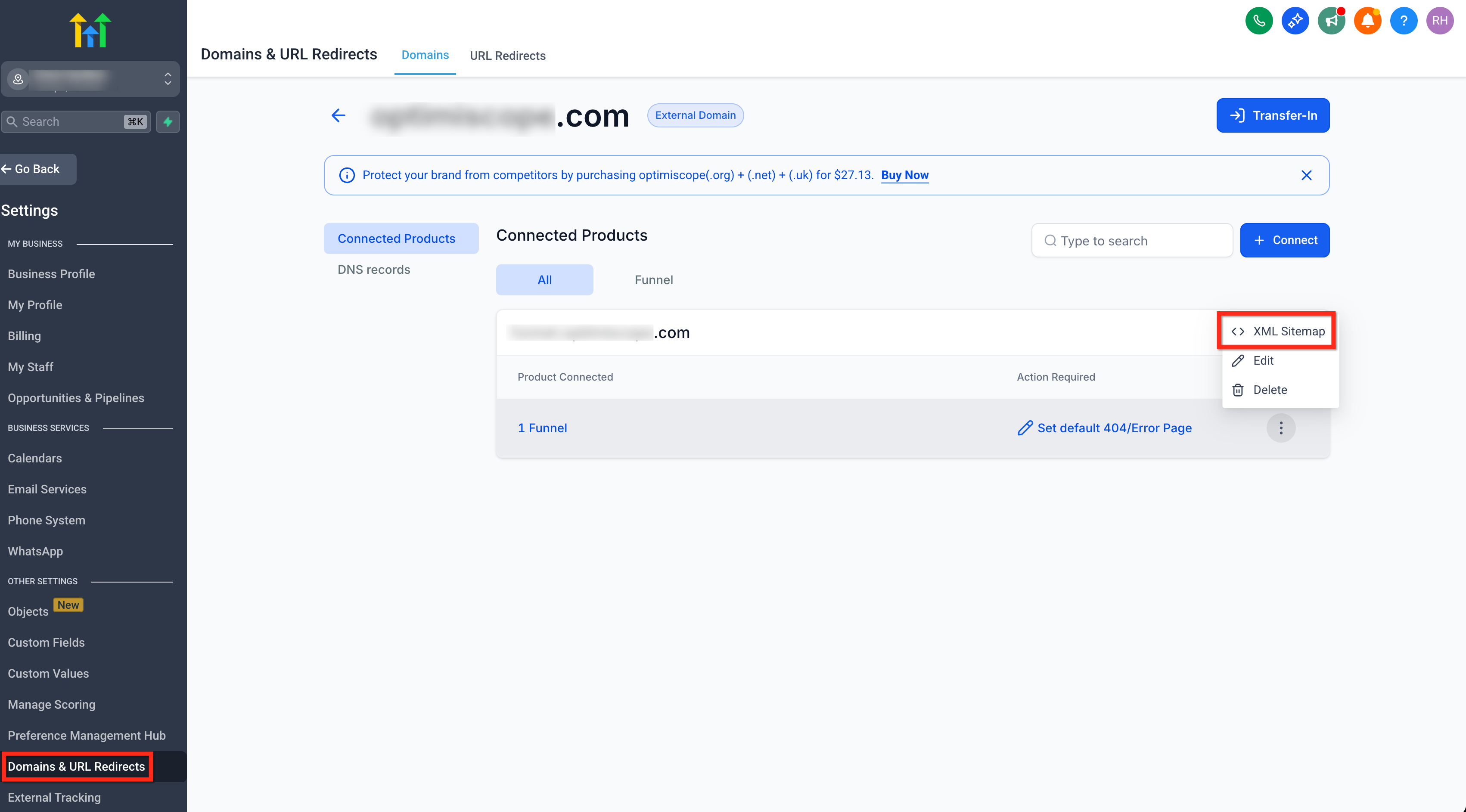
Go to Domain Settings: Navigate to Settings > Domains.
Open Domain Management: Click the three-dot Manage menu next to the domain you want to configure.
Generate the Sitemap: In the domain management area, locate XML Sitemap.
Select the pages or funnels you want included, then click Generate.Submit to Google Search Console: Copy the sitemap URL (for example, https://yourdomain.com/sitemap.xml) and submit it in Google Search Console.
Reviewing sitemap settings periodically ensures search engines focus on high-priority pages and helps maintain consistent indexing as sites evolve.
7. Mastering Robots.txt Controls
The robots.txt file acts as a gatekeeper for your website. It tells search engines which sections of the site should be crawled and which areas can be skipped.
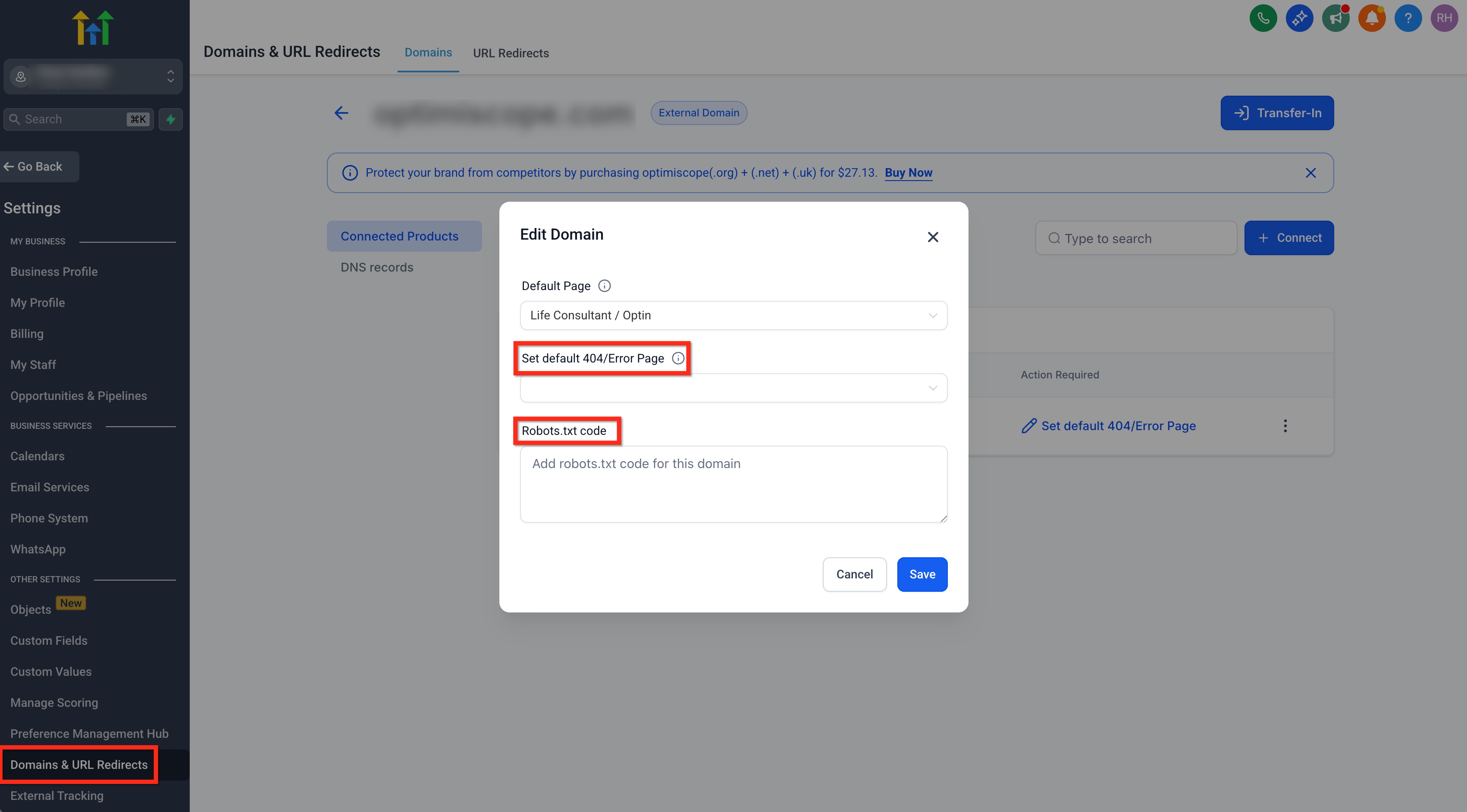
In GoHighLevel, teams have direct access to robots.txt settings, allowing intentional control over how search engines interact with site content. This flexibility makes it important to apply clear, well-defined crawl rules.
By default, a basic robots.txt file is generated. Customizing it helps guide search engines toward high-value pages and ensures crawl resources are used efficiently.
Why Customizing Robots.txt Matters
Control Crawl Focus: Exclude low-priority pages such as thank-you pages, internal test funnels, or draft utilities so search engines focus on important content.
Limit Access to Sensitive Areas: Discourage crawlers from accessing internal lead-generation paths or system-related folders that don’t need to appear in search results.
Support Sitemap Discovery: Including the sitemap URL in robots.txt helps search engines quickly locate and process your XML sitemap.
When robots.txt rules are applied intentionally, GoHighLevel sites provide clear crawl guidance while maintaining flexibility as funnels and pages evolve.
How to Edit Robots.txt in GoHighLevel
In GoHighLevel, robots.txt settings are managed at the domain level, giving teams direct control over how search engines crawl site content.
Step-by-Step: Editing Robots.txt
Open Domain Settings: Navigate to Settings > Domains.
Access Domain Management: Locate the domain you want to edit and click the three-dot Manage menu.
Find Robots.txt Settings: Look for Robots.txt or XML Sitemap settings. The exact label may vary slightly depending on your GoHighLevel version, but it is always located within the domain settings.
Add Custom Directives: Paste your robots.txt rules into the editor and save your changes.
Updating robots.txt at the domain level allows teams to guide search engines efficiently while keeping crawl rules aligned with site structure and SEO goals.
GoHighLevel SEO Launch Checklist
Use this checklist to ensure each GoHighLevel page or funnel is prepared for consistent organic visibility.
Custom URL: Manually set and lock a clean, keyword-focused URL path.
SEO Title: Front-load the primary keyword while keeping the title natural and readable.
Meta Description: Write a clear, high-intent description that encourages clicks.
Header Hierarchy: Use one H1 per page, followed by a logical H2–H3 structure.
Image Alt Text: Add descriptive alt text for all images to support accessibility and search understanding.
Canonical Tag: Define the primary URL to consolidate authority signals.
Schema Markup: Apply structured data using manual or AI-assisted JSON-LD in the page header.
XML Sitemap: Include only high-value pages; exclude utility and thank-you pages.
robots.txt Rules: Ensure important pages are crawlable and limit access to non-SEO URLs such as internal funnels or confirmations.
Page Speed Optimization: Compress images, limit heavy scripts, and monitor Core Web Vitals.
Managing this GHL SEO checklist across multiple client accounts requires consistency and process. Agencies that standardize technical SEO workflows can scale GoHighLevel projects more efficiently while maintaining long-term organic performance.
SEO Platform Comparison: WordPress vs GoHighLevel vs Wix
Final Agency Takeaway
GoHighLevel is designed to help agencies move fast, launching funnels, managing leads, and driving conversions from a single system. GHL SEO provides the foundation that allows that momentum to compound over time.
Organic search rewards discipline, consistency, and technical precision. When SEO standards such as URL stability, indexing control, structured data, and crawl guidance are applied intentionally, GoHighLevel sites can support both short-term conversion goals and long-term organic visibility.
For agencies, this creates an opportunity to pair GoHighLevel’s speed with structured SEO governance, delivering measurable, durable results for clients.
Ready to Scale?
If your agency uses GoHighLevel for websites, funnels, and automations, and wants reliable and repeatable organic growth, this is where structured SEO makes the difference.
E2M Solutions helps agencies scale through white label SEO and GoHighLevel website development services, emphasizing Technical SEO and long-term site stability.


