
Headless WordPress in 2026: Architecture, Updates and Best Practices
For years, headless WordPress occupied a specialized tier of web development. It was technically viable and highly capable, yet complex enough that agencies primarily reserved it for clients with strict performance mandates or highly experienced development teams. It remained an edge case.
With the release of WordPress 7.0 on May 20, 2026, this paradigm has fundamentally shifted. WPGraphQL has been elevated to a canonical, officially supported plugin. First-class Abilities API tokens have replaced the JWT workarounds previously relied upon for headless authentication. Furthermore, the Model Context Protocol (MCP) Adapter transforms WordPress into a programmable environment for autonomous agents. Consequently, headless architecture is transitioning from an experimental approach to a standard enterprise deployment pattern.
For technical teams evaluating a decoupled architecture, it is essential to understand what the 2026 stack entails and how to implement it correctly.
Understanding Headless Architecture
The traditional WordPress setup operates as a monolithic application. A single system manages the content, processes the business logic, and renders the frontend presentation. While this is sufficient for standard websites, it inherently limits performance, development flexibility, and omni-channel content delivery.
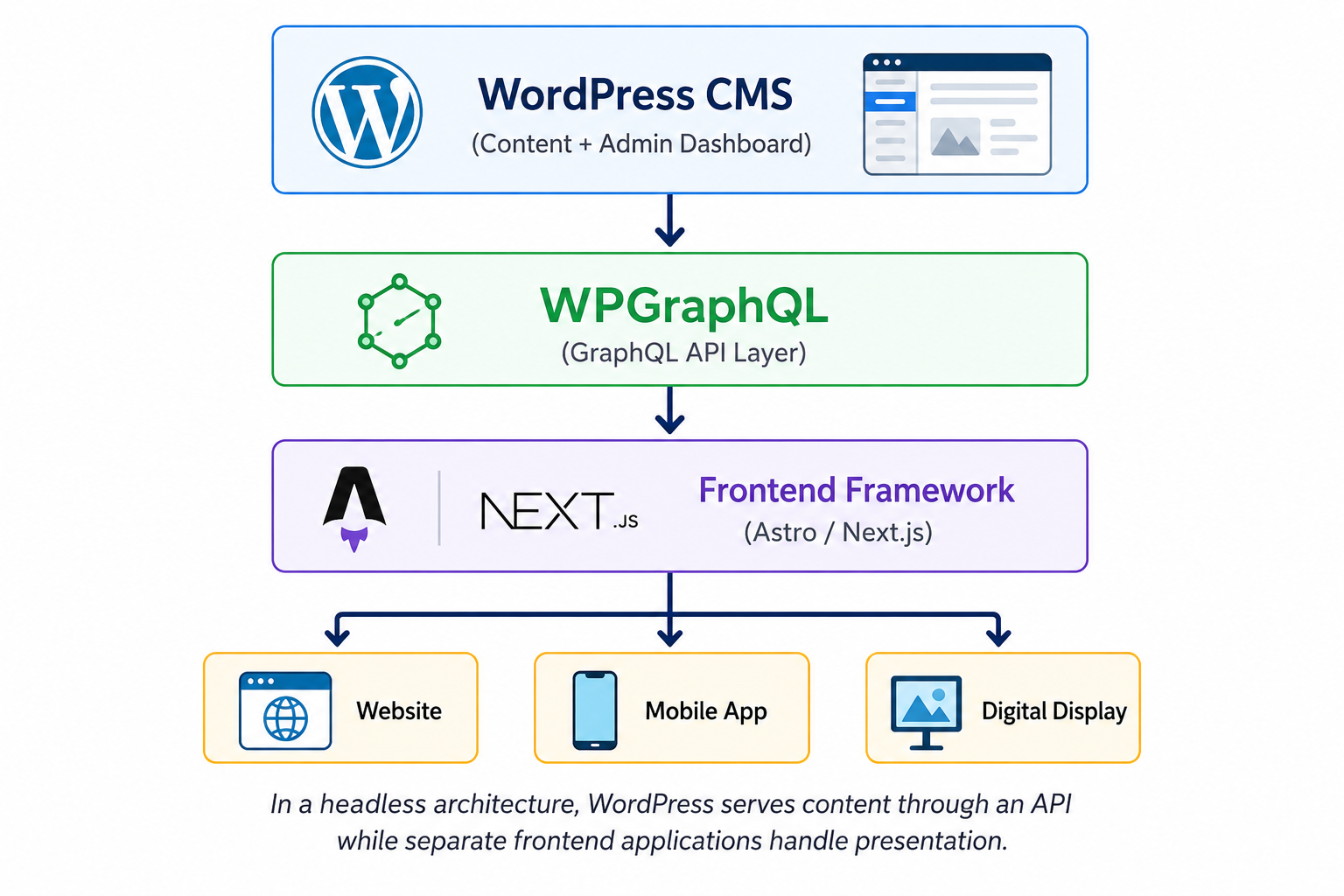
Headless architecture intentionally decouples the backend from the frontend. WordPress operates exclusively as a content management system and API layer. Editors continue to utilize the familiar administrative dashboard, but the frontend is developed as a standalone application using a modern JavaScript framework. This application requests content via the API and renders it independently.
Key Advantages:
Superior Performance: The resulting web pages achieve core web vital metrics that traditional monolithic themes struggle to attain.
Omni-Channel Delivery: Organizations can distribute the same structured content to a website, a mobile application, and a digital display network without maintaining disparate backend systems.
Developer Experience: Frontend engineering teams can utilize specialized modern tooling rather than modifying legacy PHP templates.
Architectural Tradeoffs:
Infrastructure Overhead: Teams must deploy and monitor multiple environments.
Security Complexity: Cross-domain authentication and API access control require strict configuration.
Loss of Plug-and-Play Functionality: Standard frontend plugins will no longer work out of the box, requiring custom integration.
The Data Layer: WPGraphQL 2.x vs. the REST API
Establishing the communication protocol between your frontend and WordPress is the foundational step in a headless build. Developers must choose between two robust methodologies.
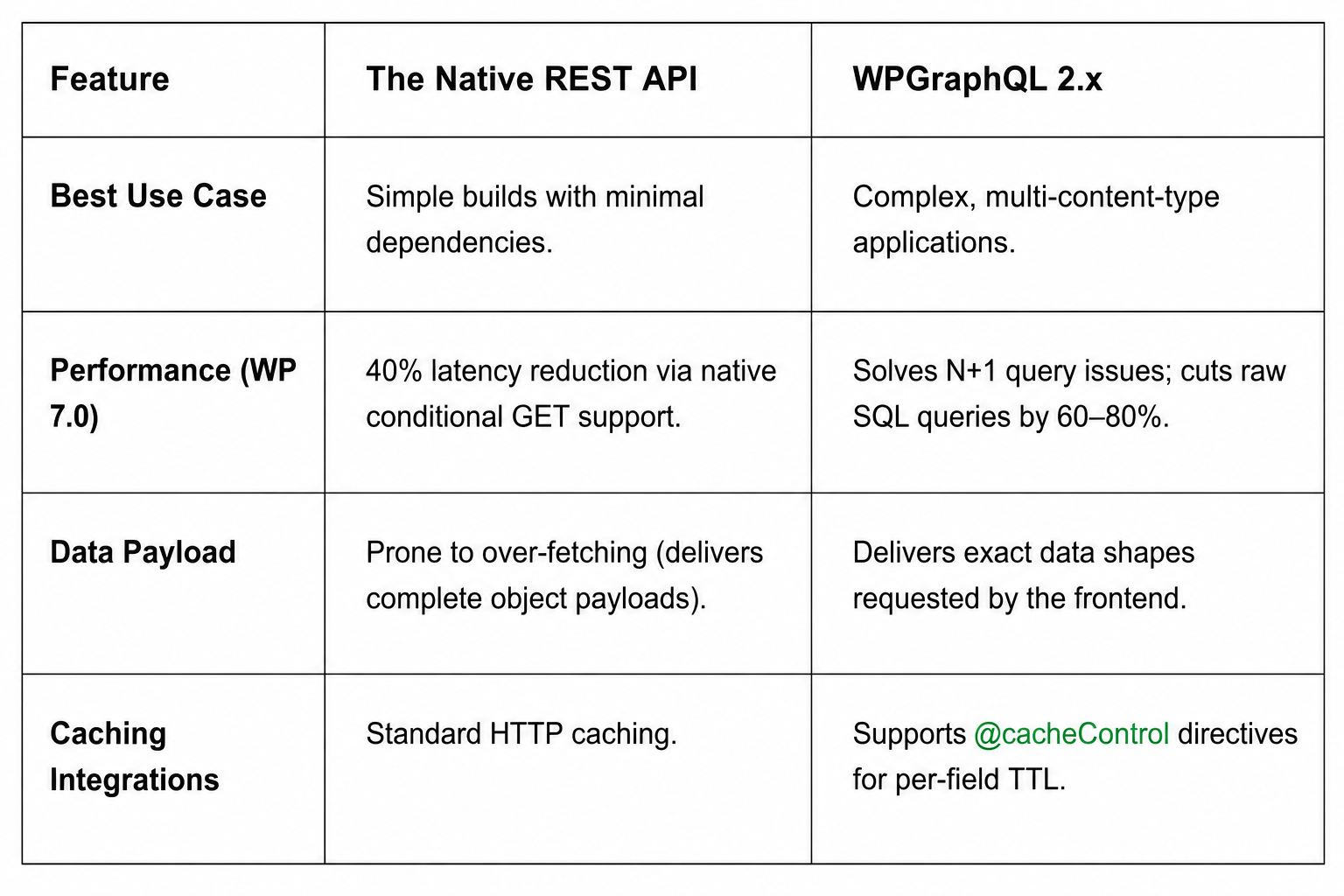
WPGraphQL is now the recommended API layer for enterprise headless builds. Version 2.x introduces internal dataloader batching that consolidates concurrent database queries. It also supports automatic persisted queries, which significantly streamlines CDN integration. While the REST API remains a viable option for straightforward projects, WPGraphQL is the optimal choice for high-traffic publishing and complex data requirements.
The Rendering Layer: Astro 6 and Next.js 16
Once the data layer is established, you must select a frontend framework for rendering. In 2026, the decision typically depends on whether the project is primarily a content publication or an interactive web application.
Astro 6
Released in March 2026, Astro 6 is the premier choice for content-centric builds such as corporate blogs, marketing sites, and digital publications. Its "Zero-JS Islands" architecture delivers pure static HTML to the browser by default, eliminating hydration overhead and JavaScript bundling issues. Interactive components are hydrated on an individual, as-needed basis. Furthermore, Astro 6 utilizes the workerd runtime for its local development server. Because this is the exact runtime utilized by Cloudflare Workers in production, environment parity issues are virtually eliminated.
Next.js 16
Next.js remains the industry standard for highly interactive web applications requiring personalized content, real-time data integration, or complex route-level caching strategies. It excels at utilizing WordPress as a content orchestration layer, pulling structured data via WPGraphQL and merging it with complex application logic. The tradeoff is a larger JavaScript footprint and a steeper infrastructure learning curve compared to Astro.
Infrastructure and Hosting Considerations
Traditional WordPress hosting is optimized for the monolithic model, relying on a single server and unified caching rules. Decoupled architecture requires distinct infrastructure environments for the backend API and the frontend application.
The backend requires granular PHP version control, dedicated staging environments, and comprehensive logging. The frontend requires edge network delivery and zero cold-start latency.
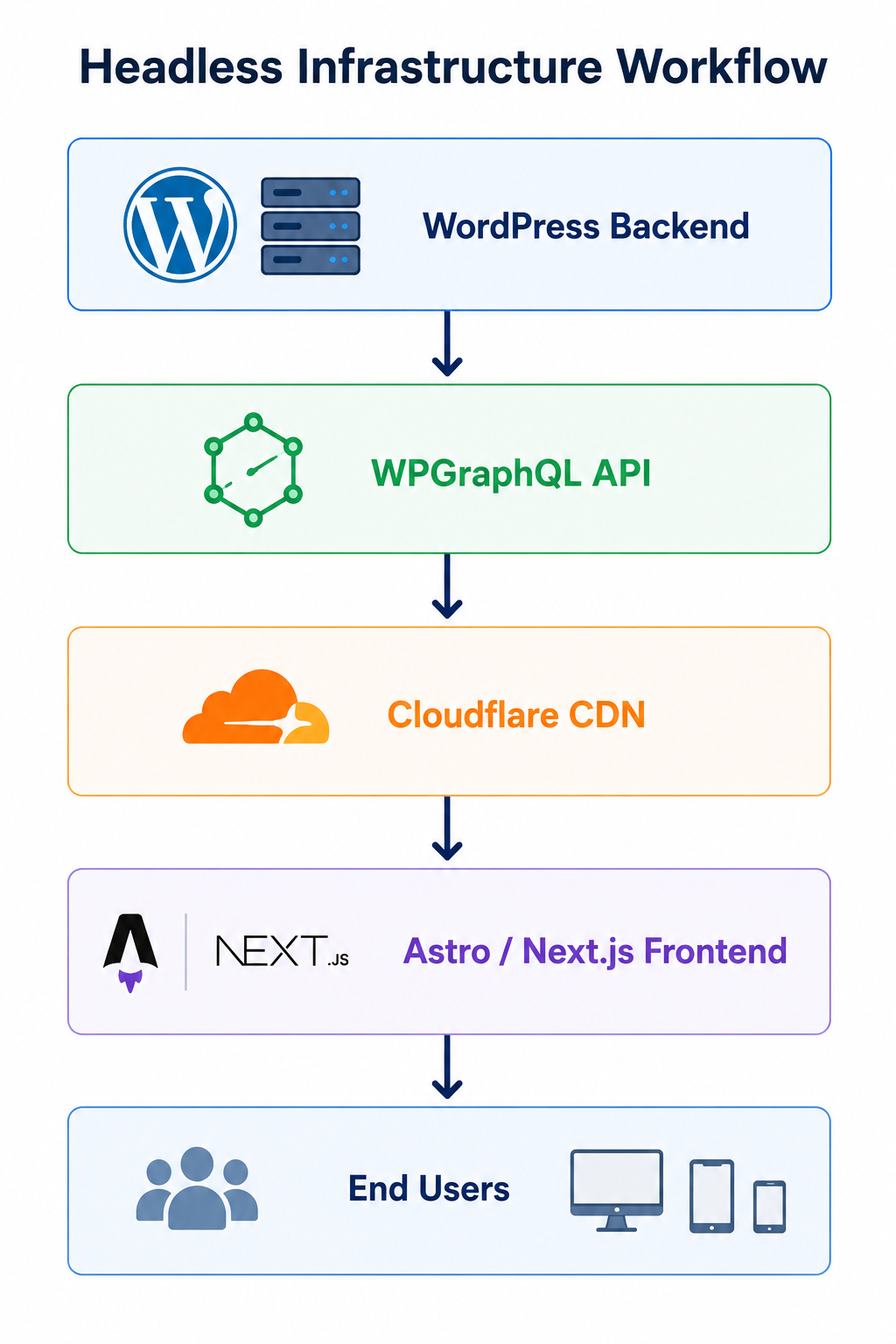
Currently, specialized hosts like GHL are excelling at the backend requirements. Administrators can seamlessly toggle PHP versions from 7.4 through 8.3 and utilize staging clones that perfectly mirror production data. This is critical for validating WPGraphQL schema modifications safely. These platforms also integrate Cloudflare Enterprise CDNs directly, which is essential for optimizing API response caching.
Industry trends indicate that hosting providers are developing unified dashboards to manage both the WordPress backend and the Node.js or static frontend simultaneously. Consolidating deployment pipelines, backups, and CDN configurations under a single provider will significantly reduce the operational burden on DevOps teams.
Authentication and Security Protocols
Decoupled architectures complicate traditional session-based WordPress authentication. Relying on standard cookies across separate domains introduces significant security and functional challenges.
Cross-Origin Resource Sharing (CORS)
Your frontend domain must be explicitly whitelisted in the WordPress configuration to permit HTTP requests. Misconfigured CORS policies result in requests failing silently in the browser, leaving no trace in the backend server logs. Proper header configuration is a mandatory initial step.
Abilities API Tokens
WordPress 7.0 officially deprecates JWT-based authentication for headless frontends in favor of Abilities API tokens. This system operates on granular, capability-based access control. Administrators can issue a token to the frontend that exclusively permits reading specific custom post types while strictly prohibiting modifications to user data or server configurations. Combined with permanent XML-RPC deactivation and enforced SSL, a properly configured 7.0 application possesses a highly resilient security posture.
The MCP Adapter: Enabling Agent-Driven Environments
The Model Context Protocol (MCP) Adapter is the most transformative feature in WordPress 7.0. It bridges the Abilities API with external AI agents, such as enterprise LLM orchestrators. In this architecture, WordPress operates as a programmable environment.
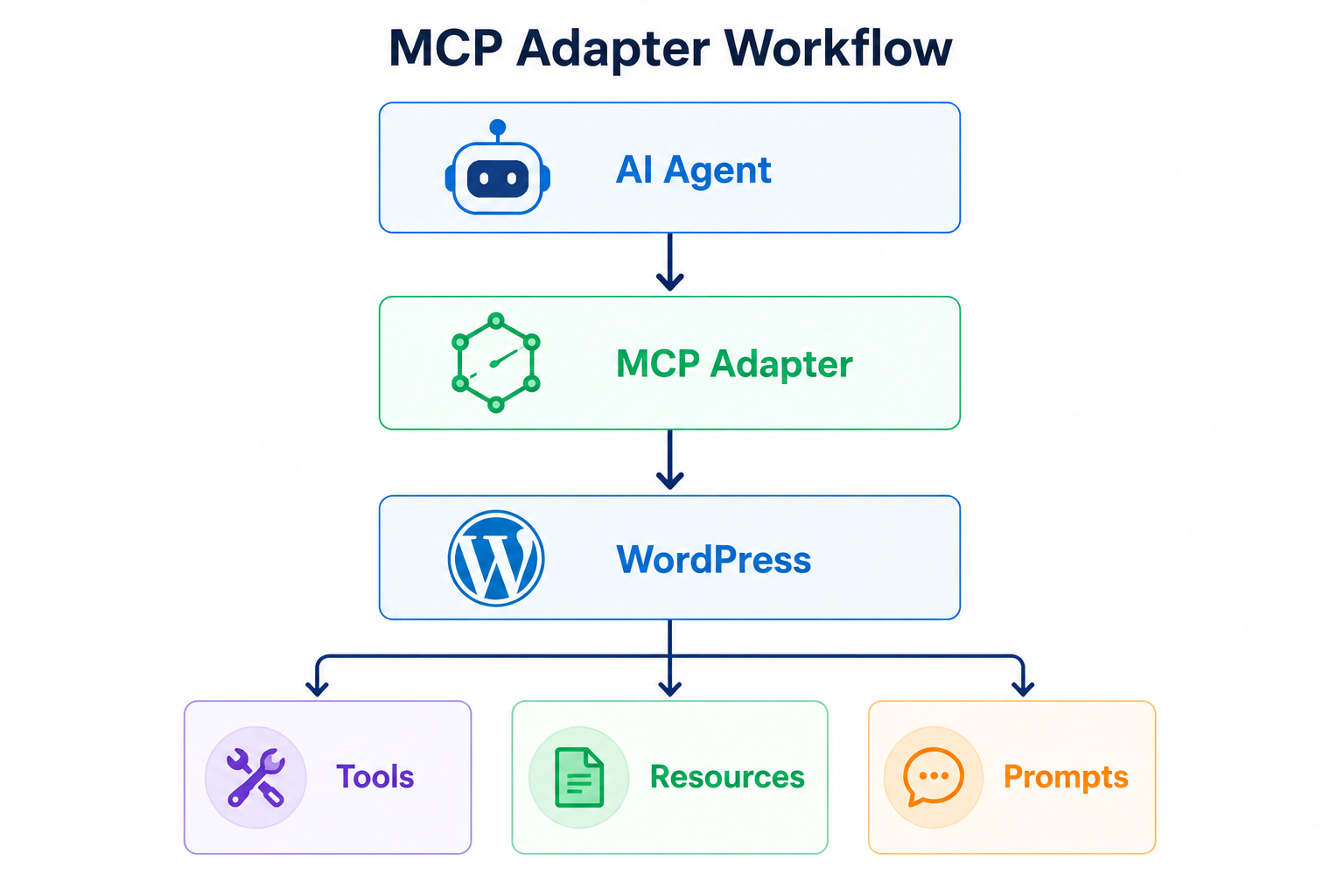
The MCP categorizes interactions into three primary primitives:
Tools: Executable actions. An authorized AI agent can invoke a tool with structured JSON arguments to publish a post, flush a cache, or update a taxonomy.
Resources: Read-only data access. Agents can ingest debugging logs or active theme configurations to build background context.
Prompts: Structural guidance templates. These provide agents with the necessary schemas to construct valid data, such as a localized Gutenberg block array.
Security is prioritized. Abilities are not exposed by default and must be explicitly enabled by developers. The HTTP transport utilizes a Node.js proxy that translates agent instructions into authenticated REST API calls, ensuring all automated actions are subject to standard rate limiting and firewall protections.
Server Operations: OPcache and PHP-FPM Management
Headless applications place heavier sustained demands on the PHP execution layer. High-performance enterprise environments utilize Zend OPcache to store precompiled script bytecode in shared memory, reducing server overhead.
However, OPcache requires precise management during deployment cycles. A common misconception is that running service nginx reload will clear cached PHP files. Nginx operates solely as a reverse proxy and delegates processing to PHP-FPM via a Unix socket. Reloading Nginx only re-parses its own configuration files.
To successfully invalidate the cache and prevent fatal class conflicts after deploying new code, administrators must execute a graceful reload of the PHP-FPM service:
Bash
sudo service php-fpm reload
# or
sudo systemctl reload php8.3-fpm
A graceful reload ensures active requests are processed before the worker processes are refreshed with an empty cache pool.
Mitigating Cache Stampedes: Flushing OPcache on a high-traffic API creates a brief vulnerability where every incoming request forces the server to simultaneously recompile core files. Engineering teams should utilize the opcache.preload directive to pre-compile critical classes before the FPM pool accepts traffic. In load-balanced environments, deployments must be staggered node by node to maintain uptime.
Incident Response and System Recovery
When critical failures occur in a decoupled environment, resolution procedures vary based on the severity of the incident.
Fatal Error Recovery Mode: WordPress automatically detects plugin conflicts or missing methods, emailing a secure recovery link to the administrator. This link initiates a session that bypasses the broken execution path, allowing for safe deactivation of the offending code without data loss.
Manual Core Rollback: If an update process is interrupted, core files may become corrupted. Administrators should connect via SFTP and replace wp-admin and wp-includes with files from a verified stable release. The wp-content directory and wp-config.php file must remain untouched.
Full Database Restoration: Severe schema corruption requires a complete database rollback. After importing verified backup tables, administrators must force a comprehensive cache purge across OPcache, Redis, and the CDN layer. Failure to clear the CDN will result in the edge network serving cached API responses that reference the deprecated database state, leading to critical application errors.
Implementation Strategy
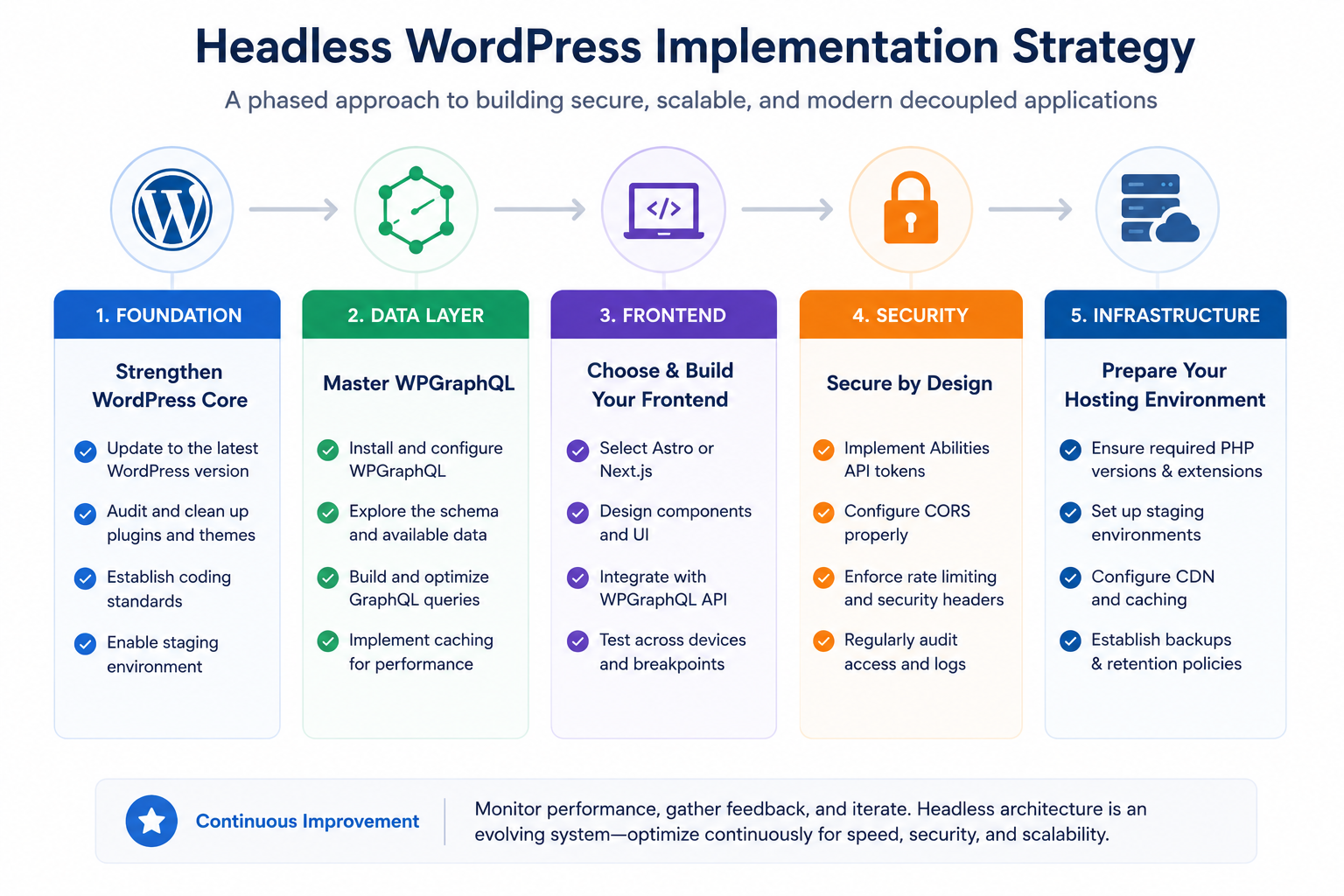
Migrating to a headless architecture requires a phased approach. Engineering teams should prioritize mastering WPGraphQL to understand how to efficiently query structured data before evaluating frontend rendering frameworks.
Security fundamentals must be established immediately utilizing Abilities API tokens and proper CORS configurations. Finally, ensure that your hosting infrastructure provides the granular PHP controls, staging environments, and backup retention policies necessary to support enterprise-grade decoupled applications.
Migrate your Wordpress site to HighLevel with ease.Learn more about GHL WordPress Hosting →


