

Release Radar blog for the week of September 7th
September 7th - September 11th 2026
Welcome back to the Release Radar Blog! From real-time speech-to-speech Voice AI and parallel Ask AI sessions to digital wallet event passes and mobile call transfers, here is a breakdown of the top features you'll want to know about.
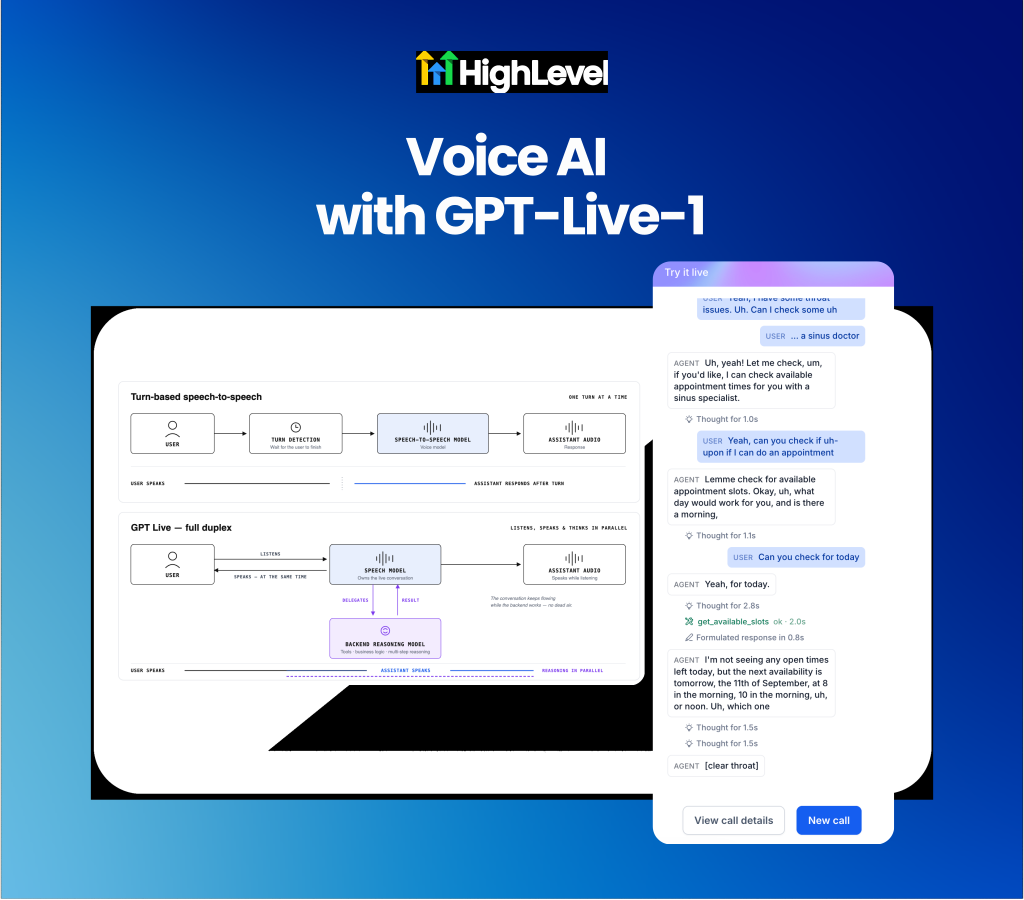
Voice AI: GPT-Live-1 speech-to-speech model
Experience real-time full-duplex conversations with GPT Live 1 in Voice AI. Turn-based Voice AI models often struggle with awkward pauses, background noise delays and dead air while processing backend tool requests. The new GPT Live 1 speech-to-speech model introduces full-duplex conversational audio with parallel processing, allowing agents to listen and speak simultaneously while delegating complex reasoning tasks in the background.
Interrupt and converse naturally with full-duplex speech: Talk over or interrupt your agent mid-sentence for fluid, real-time conversations without waiting for turn-detection gates.
Eliminate dead air using parallel reasoning models: Separate live conversational speech from backend business logic so agents continue speaking naturally while secondary reasoning models execute tools, bookings or workflows.
Voice AI: Outbound calling for speech-to-speech agents
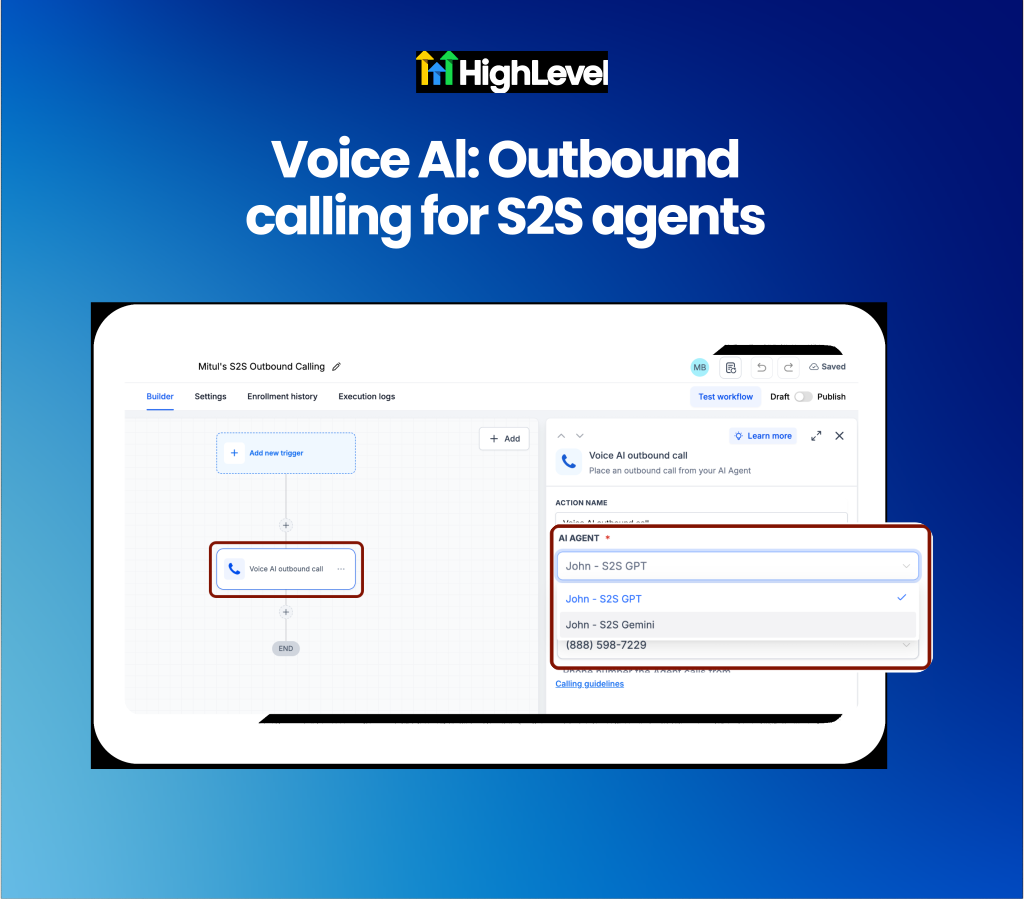
Scale outbound campaigns with speech-to-speech agents in Voice AI. Running outbound phone campaigns with traditional voice models can introduce latency and higher costs at scale. You can now select Speech-to-Speech (S2S) agents directly in the Voice AI Outbound Call workflow action, bringing real-time responsiveness and cost efficiency to automated outreach.
Outbound call centers and sales agencies running lead follow-up or reactivation campaigns can now deploy the same S2S agent for both inbound and outbound calls.
Deploy responsive S2S agents in workflows: Select S2S agents directly inside the Voice AI Outbound Call workflow action to run lower-latency outbound campaigns.
Unify agent management and compliance settings: Configure AI disclosures, welcome greetings and verbal opt-outs inside the Agent Builder while using one agent across both inbound and outbound channels.
Get started with this feature
Go to Voice AI → Agent Builder → select or create an S2S agent
Configure your AI disclosure, outbound welcome message and verbal opt-out settings
Navigate to Automation → Workflows → open or create a workflow
Click + → select Voice AI Outbound Call → select your S2S agent and save
Learn more in the Voice AI Outbound Calling Help Doc.
Mobile App: Call transfers to non-phone staff
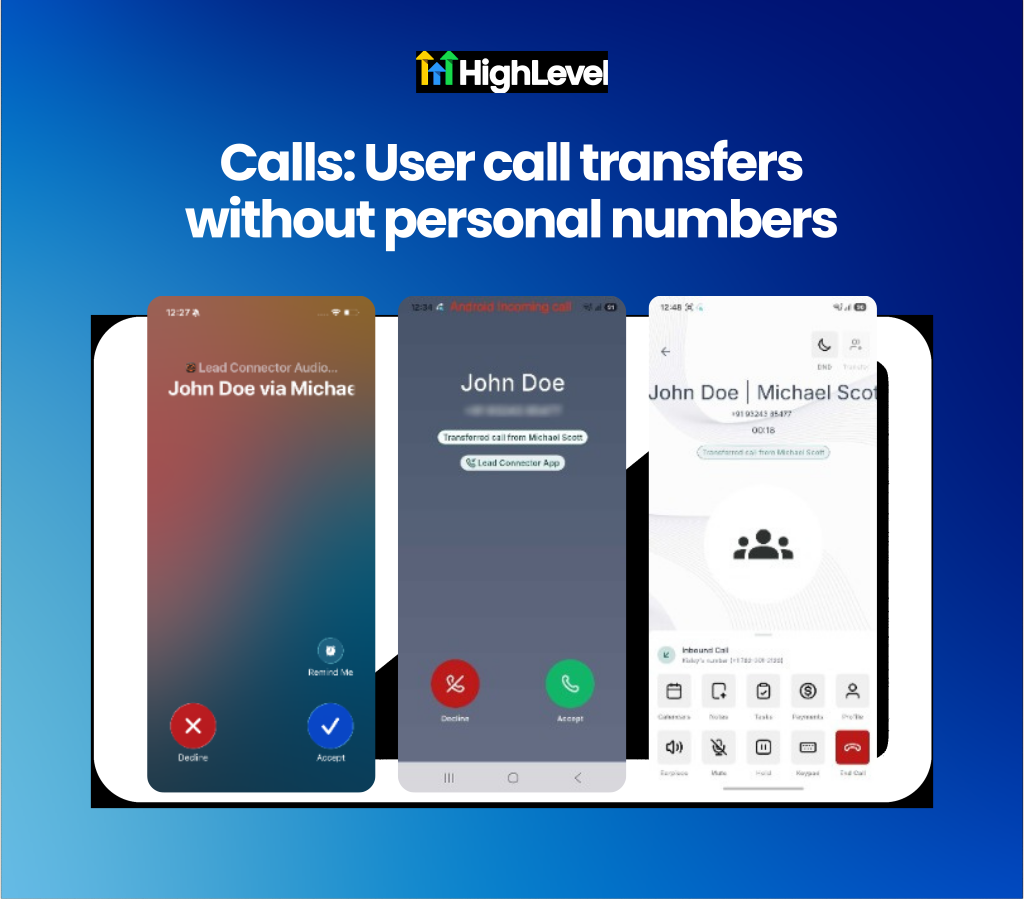
Transfer mobile app calls to staff members without personal phone numbers. Handing off client phone calls from a mobile device used to require staff members to have dedicated personal phone numbers configured. You can now transfer both inbound and outbound mobile calls directly to any staff member, ringing across their web app, mobile app, phone or SIP desk phone simultaneously.
This provides a practical solution for agencies and businesses with distributed teams or remote staff who rely on internet-based calling.
Execute warm and blind transfers on the go: Select staff members from your active call screen to initiate immediate blind transfers or consult via warm transfer before handing off the caller.
Display transfer context on incoming screens: Alert receiving team members with incoming caller banners showing who initiated the transfer and who the caller is.
Get started with this feature
1. Place or answer a call in the mobile app → tap transfer icon (top right)
2. Select Staff Members tab → tap a staff member name
3. Tap Call and Hold for warm transfer or Transfer and End for blind transfer
4. Have the receiving staff member tap Answer to complete call handoff
Learn more in the Transfer Calls to Staff Without a Personal Phone Number Help Doc.
Events: Add tickets to Apple Wallet and Google Wallet
In-person event attendees often struggle to locate their ticket emails or QR codes at the door, causing check-in delays for organizers. Attendees can now save official digital event passes directly to Apple Wallet and Google Wallet after checkout or from their confirmation notifications.
Event organizers and agencies running live events can use this to speed up door check-ins and improve the overall attendee experience.
Store official event passes: Save ticket passes displaying event details, venue timezones, attendee names and door check-in QR codes directly to mobile wallet apps.
Deliver individual wallet links automatically: Send dedicated wallet pass links for multi-ticket orders across confirmation emails, SMS, WhatsApp messages or via notification merge tags.
Get started with this feature
1. Go to Events → open your in-person event
2. Configure ticket options and confirmation notifications
3. Include the {{event.ticket.wallet_links}} merge tag in your email, SMS or WhatsApp templates
4. Save your changes → wallet download links will render automatically on checkout and confirmation receipts

Ask AI: Run multiple chats simultaneously
Waiting for Ask AI to generate long reports or complex data analyses previously blocked team members from starting new queries or checking previous chats. Ask AI now supports parallel session processing, allowing you to run multiple questions in the background at the same time without interrupting or canceling ongoing requests.
Execute up to ten background requests simultaneously: Submit large prompts, open new chat windows and ask follow-up questions while previous responses continue generating.
Track live progress with dedicated chat indicators: Inspect chat history to view active spinner icons for running queries and unread notification dots for completed responses.
Get started with this feature
1. Open Ask AI from your navigation menu
2. Enter a prompt and click Send
3. Click Chat history → tap New Chat to start a second query while the first one runs
4. Switch between active sessions anytime using Chat history without canceling background progress
Learn more in the Ask AI Multi-Threading: Run Multiple Tasks at Once Help Doc.

For a complete overview of this week’s updates 👉🏻Check out the slides here!
Want to help your clients or team master these new tools under your own brand?
Explore our collection of customizable guides and materials in the HighLevel University White Label Resources Course.
New to HighLevel? Start a FREE TRIAL today!