
The Plugin Tax: Why Running WordPress Security at the Application Level is Killing Your Performance
Security plugins kept WordPress sites safe for over a decade. But the performance trade-off they demand was never supposed to be permanent.
The hidden cost of doing security the traditional way
Most of us have been through it. You spin up a WordPress site, get the theme going, install your plugins, and somewhere along the way - a blog post, a colleague, a Reddit thread - you're told to install a security plugin. Wordfence, Sucuri, Solid Security. Standard advice, and for a long time, it was the right advice.
These plugins filled a real gap. Early WordPress hosting offered almost nothing in the way of built-in security, and plugins like Wordfence stepped up to protect millions of sites from real threats. That matters, and it shouldn't be dismissed.
But there's a cost to this approach that doesn't get talked about enough. Every security plugin that runs its engine in PHP adds a processing toll to every single page load — every visitor, every request, every crawl passes through it before WordPress can do anything useful. That's the plugin tax. And you're paying it whether there's a threat present or not.
Quantifying the overhead
Every plugin adds some overhead — that's expected. But security plugins that execute WAF rules and scan logic in PHP carry a heavier load than most, and there's independent benchmark data to quantify it.
PluginTests.com runs automated performance tests on WordPress plugins in a controlled environment. Their most recent results paint a clear picture of the page load time each security plugin adds:
Wordfence (v8.1.4): +0.224 seconds per page load, plus 731 KiB additional memory per request (source)
Solid Security (v9.4.7 Basic): +0.097 seconds per page load, plus 1.29 MiB additional memory per request (source)
WP Cerber (v9.1): +0.081 seconds per page load, plus 283 KiB additional memory per request (source)
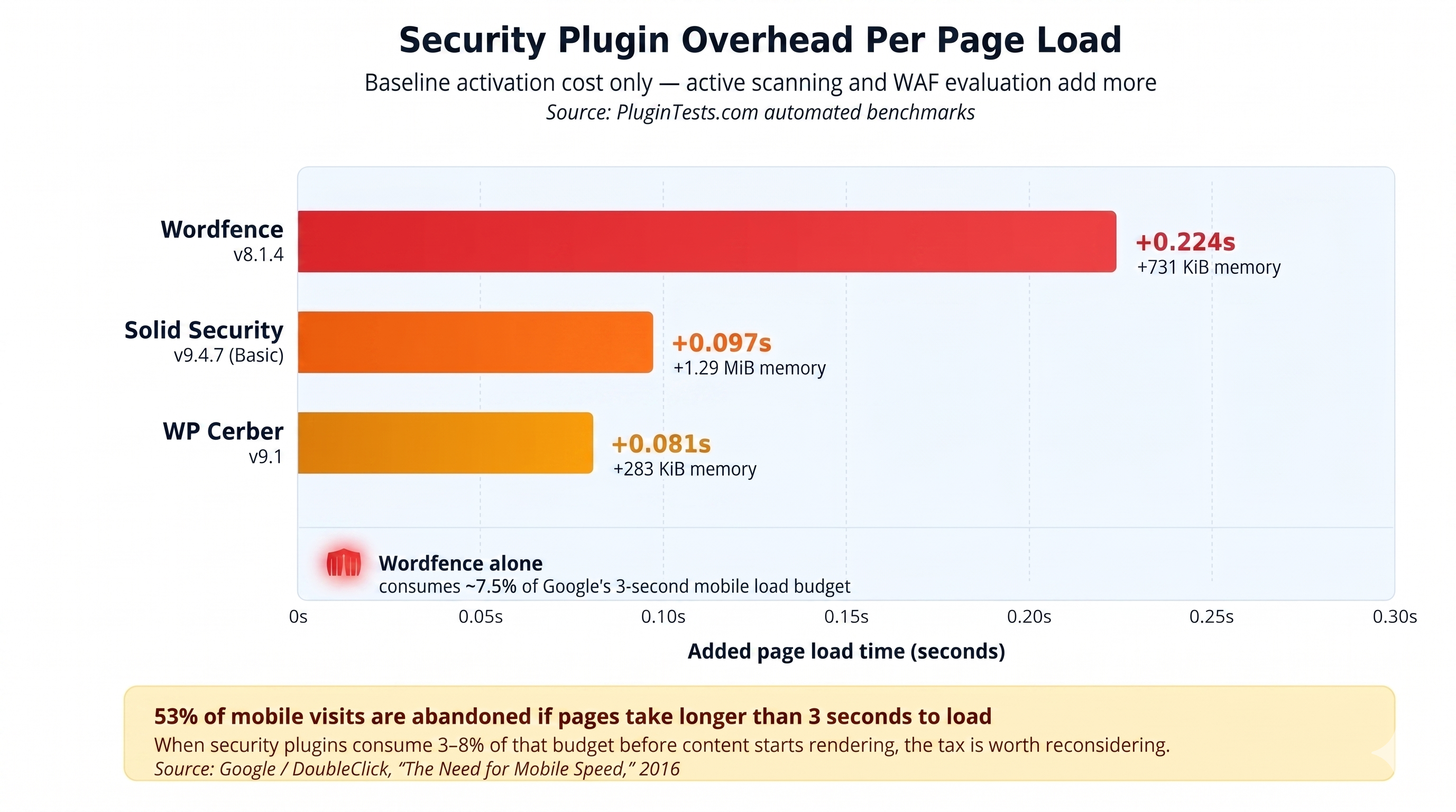
Figure: Security plugin overhead per page load
A quarter of a second on every page load adds up. Google's research (DoubleClick, "The Need for Mobile Speed," 2016) found that 53% of mobile site visits are abandoned if pages take longer than 3 seconds to load. When security plugins consume 3–8% of that budget before content even starts rendering — Wordfence alone takes ~7.5% — it's worth asking whether there's a better place for that work to happen.
It's also worth noting that these PluginTests numbers represent baseline activation overhead — they don't capture the additional cost of active scanning, WAF rule evaluation on POST requests, or the cumulative load under real concurrent traffic.
Memory and hosting compatibility:
Wordfence's own documentation states a minimum PHP memory limit of 128 MB for the plugin to function. That's a non-trivial memory reservation on shared hosting plans where total available memory may be limited.
The resource profile has been significant enough that major managed hosts have taken action. WP Engine disallowed Wordfence starting in 2014 because their platform's security policy restricted writing to PHP files from external requests — a policy that conflicted with how Wordfence stored its WAF rules on the filesystem. The two companies eventually collaborated to move WAF rule storage to the database, resolving the incompatibility. Today, WP Engine provides its own infrastructure-level security through Global Edge Security (powered by Cloudflare), handling WAF, DDoS protection, and CDN at the edge — the same layered approach we're describing here.
Why this is an architecture problem, not a plugin problem
This isn't really about any individual plugin being poorly built. Wordfence, for example, is a genuinely capable security tool that has protected a significant number of sites from real attacks. The issue is where these tools operate in the request lifecycle — and specifically, what kind of work they do in PHP.
Think of it as placing a bouncer inside the kitchen instead of at the front door — the bouncer might be excellent at their job, but the positioning undermines the efficiency.
Consider what happens when a visitor requests a page on a site with an active security plugin doing WAF work in PHP:
Request hits your server
Apache or Nginx picks it up, hands it to PHP
Handover execution to WordPress
WordPress loads every active plugin, including your security plugin
Security plugin intercepts the request — runs WAF rules, IP lookups, geolocation checks, threat database comparisons
Then WordPress finally starts building the page
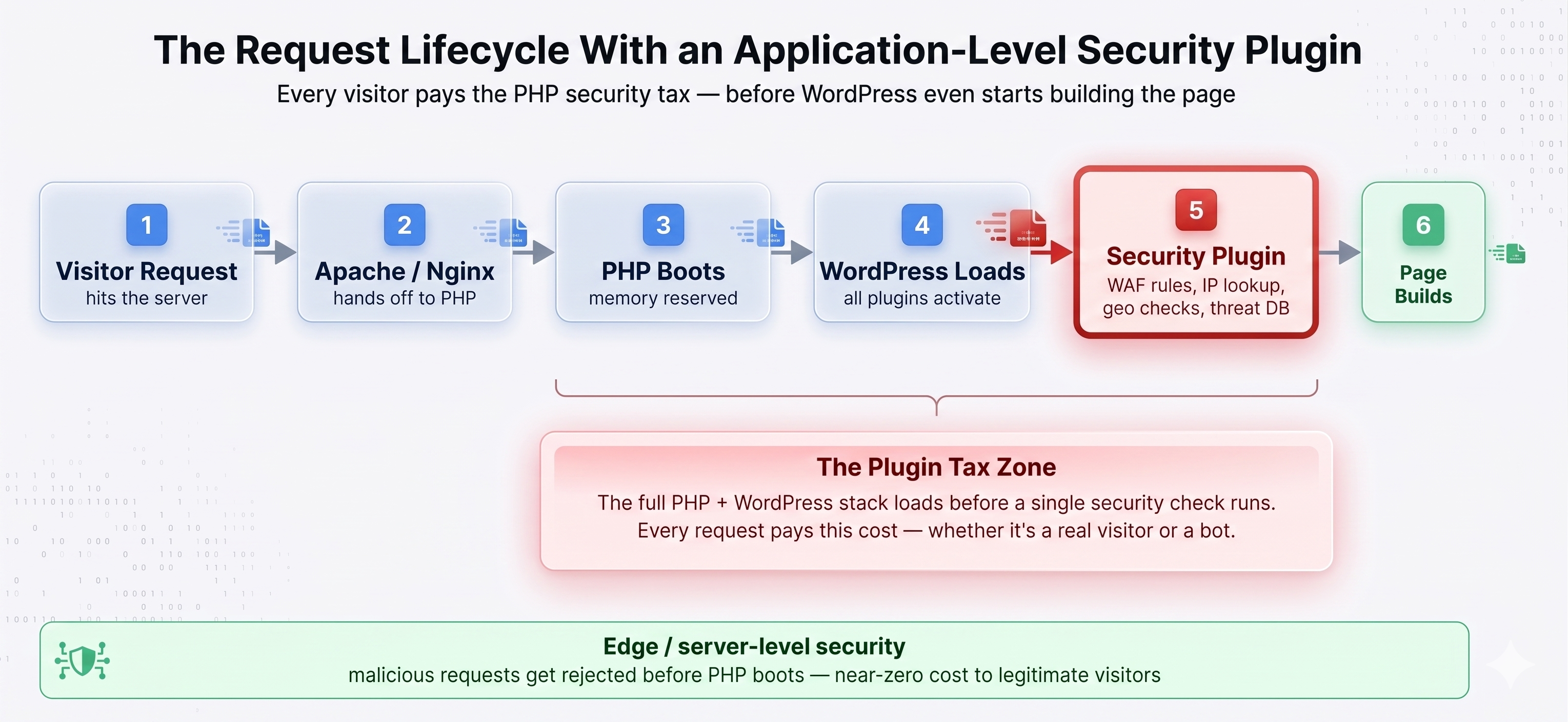
Figure: The request lifecycle with an application-level security plugin
In most configurations, the security plugin can only do its job after WordPress has fully loaded. (Wordfence does offer an "Extended Protection" mode that uses PHP's auto_prepend_file to run its WAF earlier in the PHP lifecycle — before WordPress boots. It's a meaningful optimization, but the WAF is still executing in PHP on your server, consuming the same CPU and memory resources.) By that point, the server has already committed resources to the request. If the visitor turns out to be malicious, those resources were spent anyway. And if they're legitimate — which the vast majority are — the security evaluation was overhead that didn't need to happen at this layer.
The server ends up doing double duty on every request: load the full application stack, then run a security evaluation on top of it. That adds up fast with concurrent traffic.
The PHP overhead compounds quickly
Every active plugin adds PHP execution time to every request. Most plugins add a small amount — a contact form plugin that isn't being used on a given page still loads its PHP files. The overhead is usually small enough to ignore individually, but it accumulates.
Security plugins that run WAF logic in PHP fall into a different category because they're not passive. On every request, they're actively parsing request headers, POST data, query strings, file uploads, and cookies. They're matching patterns against threat databases, logging activity, and running geo-IP lookups. All in PHP, all on your server, and all the time — not just on the pages where security is relevant, but on every single request.
And then there's scanning — if it runs on your server
On top of the per-request overhead, traditional security plugins periodically scan your entire WordPress installation for malware from within the site itself. That means reading every file, comparing hashes, running pattern matching against known signatures, doing static analysis on code — all using the same CPU, memory, and disk I/O that's serving your visitors.
According to Wordfence's own benchmarks, Wordfence CLI processes approximately 324 files per second and 13 MB per second using 16 workers on an AMD Ryzen 7 1700 — which is actually impressive engineering. But on a large WordPress installation with thousands of files across plugins, themes, and uploads, that scan takes real time and real server resources — resources that are simultaneously trying to serve your visitors.
Most security plugins offer a "low resource scanning" mode, which helps — but it's fundamentally a trade-off between scan speed and site performance. You're choosing between a shorter high-impact window or a longer low-impact one. The overhead doesn't go away; it just gets spread differently.
There's a different architecture that sidesteps this entirely. Instead of running the scan engine on the customer's server, a lightweight plugin can act as a sensor — observing file changes, plugin updates, cron jobs, and option writes — and stream those signals to a cloud backend where the heavy analysis (YARA rules, signature matching, anomaly detection) actually runs. The site plugin does near-zero CPU work. The scan happens asynchronously, off-site, on infrastructure built for it. We'll come back to this.
The compounding effect
The plugin tax isn't a flat rate. It grows over time.
Redundant processing. It's not uncommon for site owners to install two or three security plugins, assuming more coverage equals more protection. In practice, each plugin runs its own WAF rules, its own scans, its own logging — completely unaware of the others. The result is overlapping work at a multiplied cost.
Log table bloat. Security plugins are prolific loggers — login attempts, blocked IPs, firewall events, scan results all go into your database. Over months and years, those tables grow considerably. Bloated tables affect the performance of every query on your site, not just the security-related ones. And most site owners rarely clean them up.
The traffic paradox. This is the one that tends to catch people off guard: the more traffic your site receives, the more expensive the plugin tax becomes. More concurrent visitors means more simultaneous security evaluations, which translates to higher resource consumption. During a traffic spike — or an actual attack — the security processing can consume enough resources to degrade the very site it's meant to protect. That's not a criticism of any particular plugin; it's an inherent limitation of doing this work at the application layer.
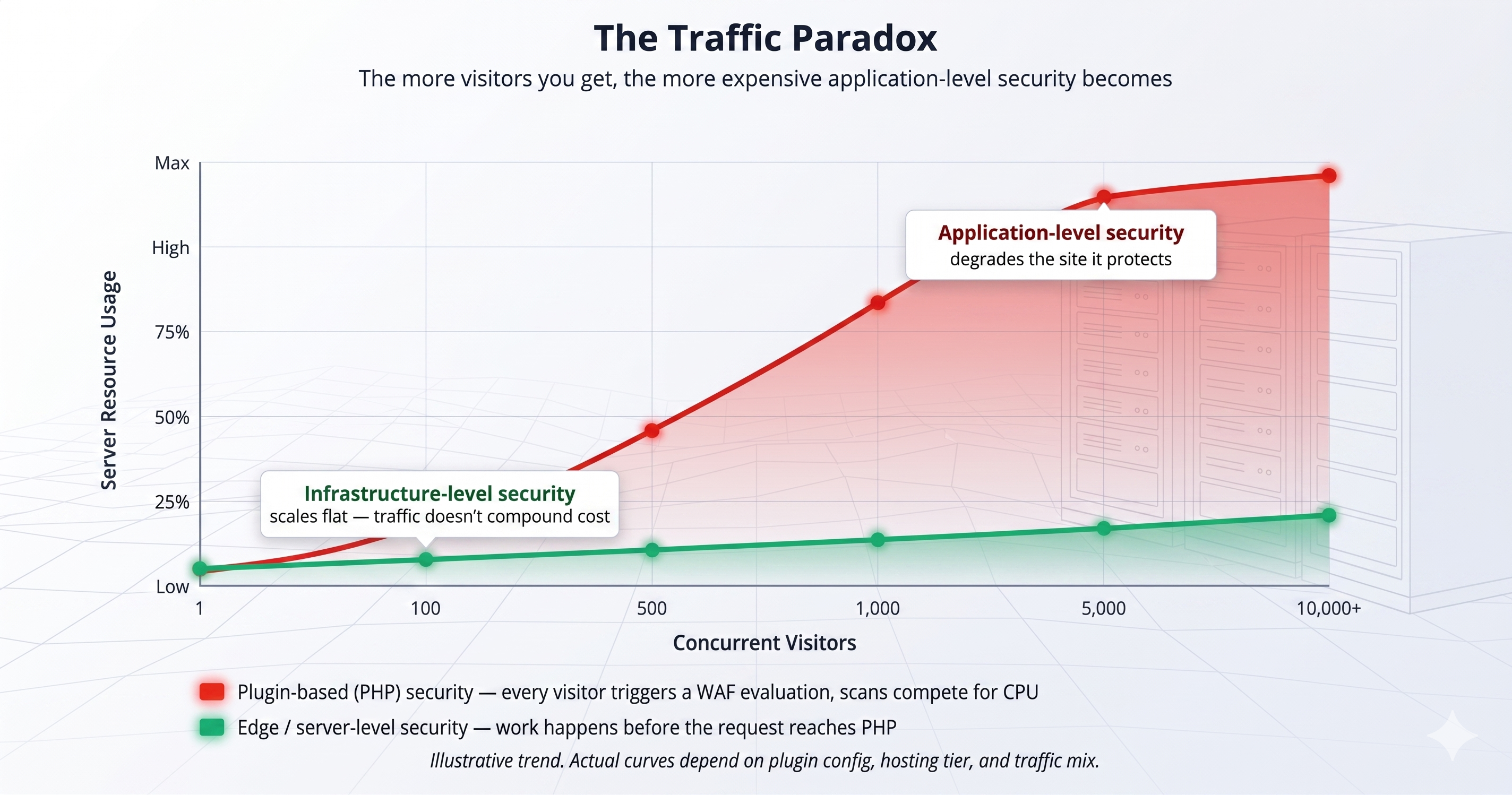
Figure: The traffic paradox: plugin overhead vs. infrastructure security under concurrent load
The case for application-level context (and what it should actually cost)
Before moving on, it's worth addressing the strongest argument in favor of having any security code on the site at all: context. A plugin running inside WordPress can see things an edge WAF can't — which user is logged in, what their role is, which specific plugin vulnerabilities are present on that particular installation, which file just changed on disk. That application-aware intelligence is genuinely valuable, and it's part of why these plugins became so widely adopted.
The question isn't whether that context matters — it does. The question is whether every request needs to pay the PHP cost of acquiring it.
The answer is: no. A plugin that captures the context (observing a file change, a new admin user, a plugin update) and emits it as a lightweight event doesn't need to run a WAF engine on every page view. It doesn't need to scan in PHP. It doesn't need 128 MB of reserved memory. It just needs to notice what happened and hand it off.
That's a different class of plugin entirely - one where the site context is still captured, but the analysis happens somewhere else.
A better place for security to live
With that in mind, the practical question is: where should security work happen? The short answer is — as far from synchronous PHP execution as you can push it.
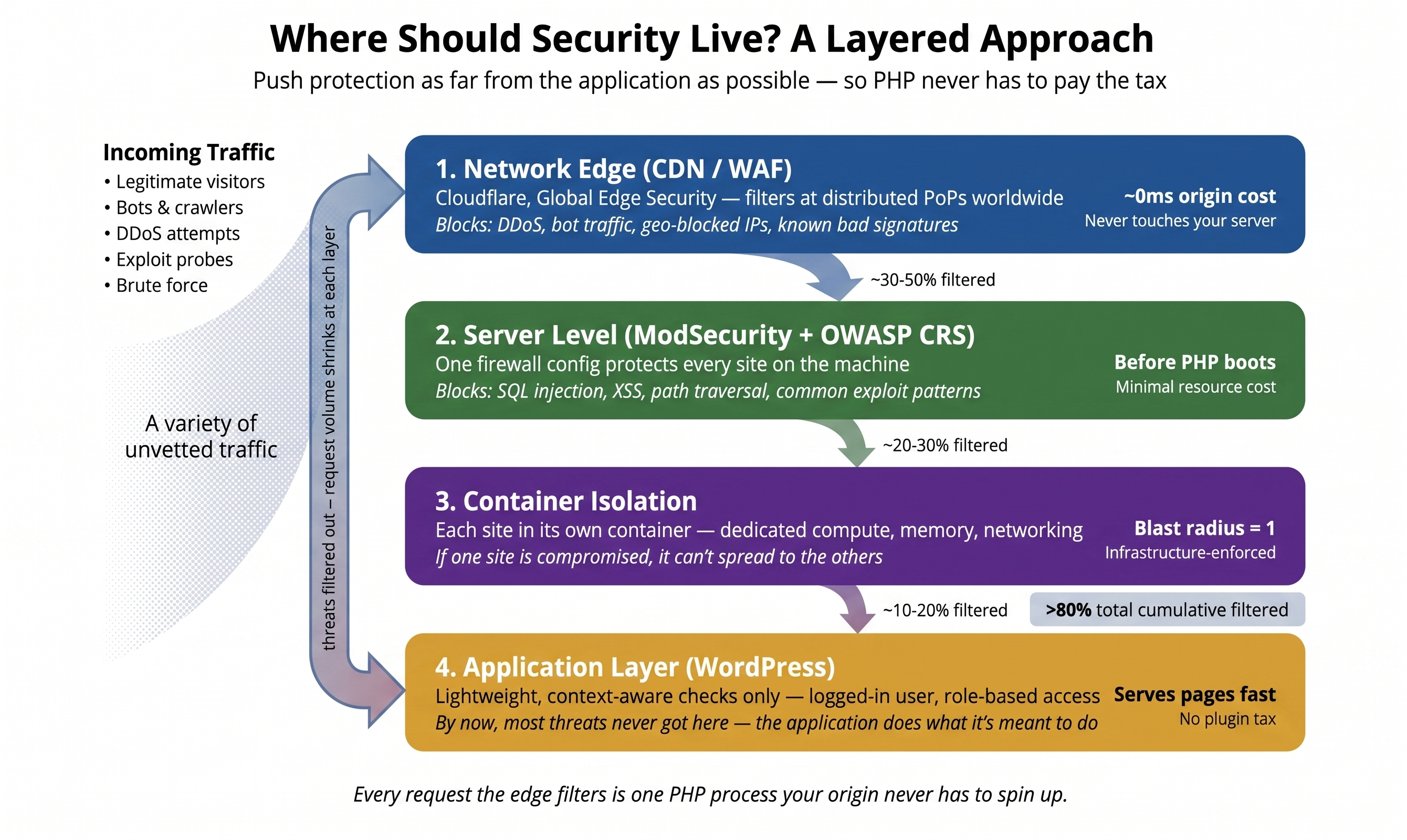
Figure: A layered approach to WordPress security
At the network edge
The most effective place to intercept unwanted traffic is before it reaches your server. CDN-level WAFs operate at globally distributed edge nodes, filtering requests before they're routed to your origin.
The performance math is straightforward: traffic filtered at the edge never reaches your origin server, so it consumes zero PHP execution time, zero database queries, and zero memory on your hosting. Contrast that with an application-level WAF that processes every request after the full WordPress stack has loaded.
The scale of unwanted traffic is significant. Kinsta's analysis of 13 billion access log entries found that bots, APIs, and search engine crawlers make up roughly 19% of all requests to WordPress sites — traffic that ideally gets filtered before it ever reaches the application layer.
At the server level
Below WordPress, below PHP, server-level firewalls like ModSecurity with OWASP Core Rule Set can catch common attack patterns (SQL injection, XSS, path traversal) before the application stack even loads. One configuration protects every site on the server. If a request is malicious, it gets rejected before PHP ever boots — near-zero cost compared to an application-level evaluation.
Through container isolation
Modern managed hosting runs each WordPress site in its own isolated container with dedicated compute, memory, and networking. If one site gets compromised, it doesn't spread. This is fundamentally different from the plugin approach, which tries to defend a site from within the app. Container isolation defends from the infrastructure level — a compromised site is contained by design.
With sensors, not scanners
The final layer is the one we hinted at earlier — and it's where application context gets captured without the application-level tax.
Instead of a heavyweight plugin running WAF rules and scan engines in PHP, a lightweight plugin acts as an event sensor. It observes things that actually matter — a file hash changes, a plugin gets activated, a new admin user is created, a cron job gets registered — and emits those as structured events to a backend API. The scan engine (YARA rules, signature matching, anomaly detection) runs asynchronously, off-site, on purpose-built infrastructure.
The site plugin does near-zero CPU work on every page load. There's no WAF evaluation in PHP. There's no on-server scan competing with visitors for CPU and disk. And critically, the backend can batch, de-duplicate, version its rules in containers, and scale horizontally — none of which is possible when the scan engine lives inside a WordPress install.
This is the pattern endpoint-detection tools have used on servers and laptops for years (CrowdStrike, SentinelOne). It hasn't fully arrived in WordPress yet — but it's where the architecture is heading, and it's what we're building with ThreatLens: a lightweight sensor plugin that streams events to GHL's cloud, where a YARA-based scan engine does the actual analysis. File integrity, plugin changes, suspicious options, and cron anomalies get observed on the site and analyzed off it. Findings surface in the dashboard. Your visitors never compete with a malware scanner for CPU.
If you're running sites for clients, think about the scale
When you're managing WordPress sites for clients through GHL, the plugin tax multiplies across your entire portfolio. Each site running its own security plugin stack is a site carrying its own overhead, its own update risks, its own scanning windows.
With GHL WordPress Hosting, security is a platform-level capability — consistent across every site you manage. Edge-level WAF and DDoS filtering happens before traffic reaches the origin. Server-level rules catch common attack patterns before PHP boots. Container isolation means a compromise on one site can't spread to another.
Your clients get solid protection without the performance trade-off, and you get a simpler stack to maintain.
Practical next steps
Whether or not you're considering a hosting change, there are steps worth taking right now:
Audit your security stack. How many security plugins are you running? It's not uncommon to find two or three with overlapping WAF rules, each independently adding overhead to every request.
Measure the actual cost. Install Query Monitor temporarily to see the backend impact — database queries, PHP execution time, memory usage per request. Then run your site through GTmetrix or PageSpeed Insights to see the frontend effect on load time. Seeing both sides of the picture makes it much easier to decide what stays and what goes.
Check what your host already provides. Many modern hosts include server-level firewalls, WAF protection, and malware scanning. If yours does, there may be significant overlap with what your plugins are doing — and you could reduce the overhead without sacrificing protection.
Consider infrastructure-first hosting. Platforms like GHL WordPress Hosting are built to handle security at the infrastructure level. It's a different model - one where you don't have to choose between protection and performance.
The bigger picture
Security plugins weren't a mistake — they were the right solution for a time when hosting infrastructure didn't do enough. Wordfence, Sucuri, and others genuinely protected millions of WordPress sites, and they still serve a purpose on hosting that offers minimal built-in security.
But the landscape has changed. Modern infrastructure can handle security at layers where the performance cost is a fraction of what application-level plugins require. Edge WAFs, server-level firewalls, container isolation, and sensor-plus-cloud scanners — these aren't futuristic concepts. They're available now, and they let you have strong security and fast performance instead of choosing between the two.
Every page load that routes through a PHP-based WAF, every scan that shares resources with your visitors, every database query that exists to log a blocked request — that's the plugin tax. It was an acceptable cost when there was no alternative. There is now.
You shouldn't have to choose between a fast site and a secure one. GoHighLevel WordPress Hosting handles security at the infrastructure level — edge WAF, server-level rules, container isolation, and our upcoming ThreatLens scanner — so your sites stay protected without the performance trade-off. Learn more about GHL WordPress Hosting →


