
WordPress Theme Selection for Performance and Scalability
If a WordPress site exhibits slow performance despite standard optimization efforts, the underlying issue is often not the environment or configuration - it is the theme.
Themes play a foundational role in determining how efficiently a website loads and renders. They control asset delivery, page structure, and the overall complexity of the frontend. As WordPress continues to evolve with performance-focused improvements, the effectiveness of those enhancements depends significantly on the theme in use.
In 2026, selecting a theme is not merely a design decision. It is a critical factor that directly influences load time, responsiveness, and scalability.
This guide outlines a structured approach to choosing a WordPress theme without introducing performance bottlenecks.
Why Theme Choice Matters for Performance
Modern WordPress includes improvements in asset loading and rendering efficiency. However, these benefits are realized only when the theme adheres to efficient development practices.
A theme directly impacts:
CSS and JavaScript loading behavior
Total page size and number of network requests
DOM complexity
Presence of render-blocking resources
An inefficient theme can introduce unnecessary overhead, reducing performance regardless of other optimizations.
Installing WordPress Themes: A Step-by-Step Guide
1. Installing a Theme from the WordPress Theme Directory
This is the recommended method for beginners, as it is secure, straightforward, and fully integrated within WordPress.
Procedure
Log in to your WordPress administrative dashboard
(e.g., yourwebsite.com/wp-admin)Navigate to:
Appearance → Themes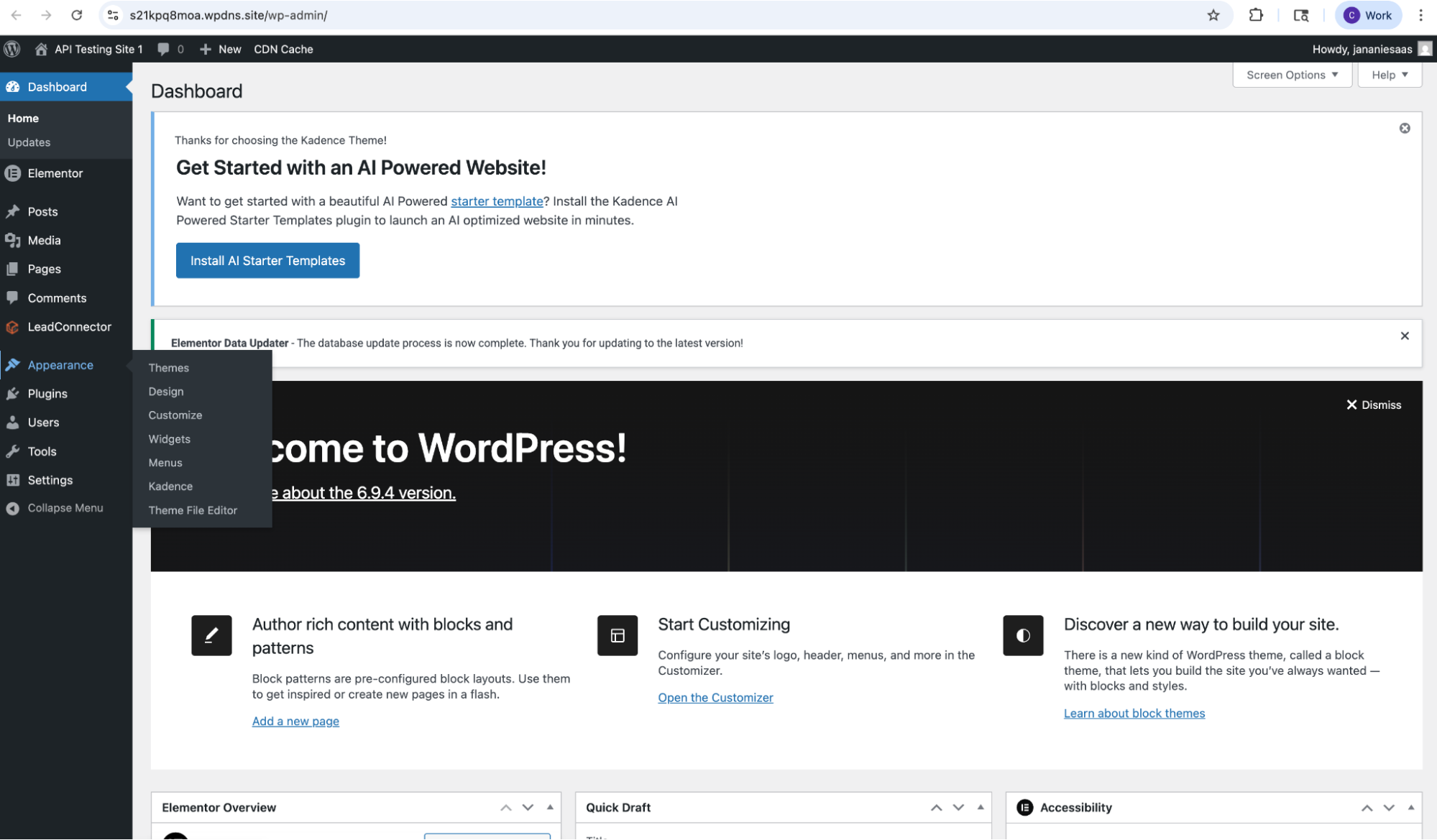
Click “Add Theme” to access the official theme repository.
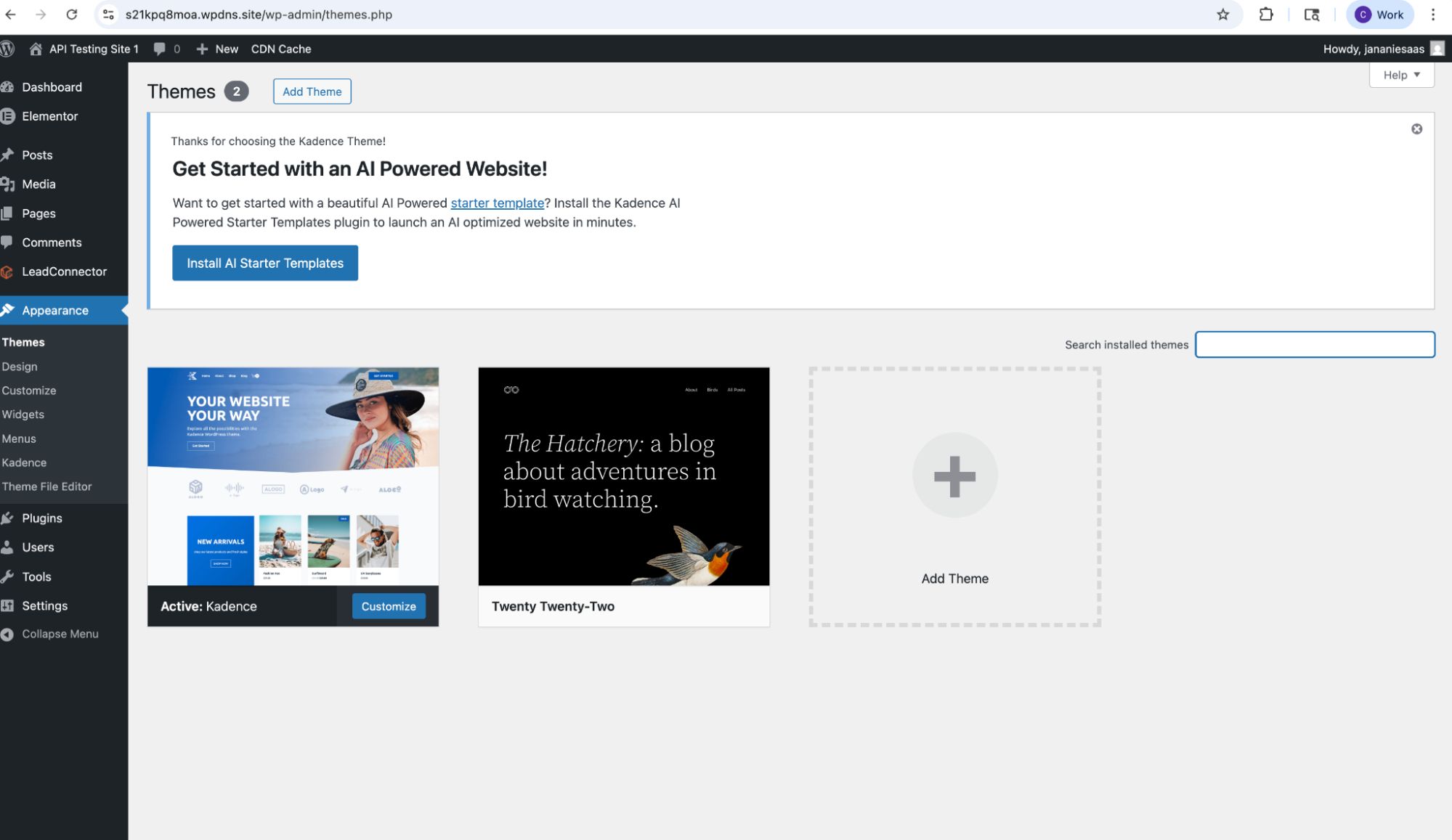
Browse featured themes or use the search bar to find specific options
(e.g., Astra, GeneratePress, Neve)Click “Install” on the desired theme.
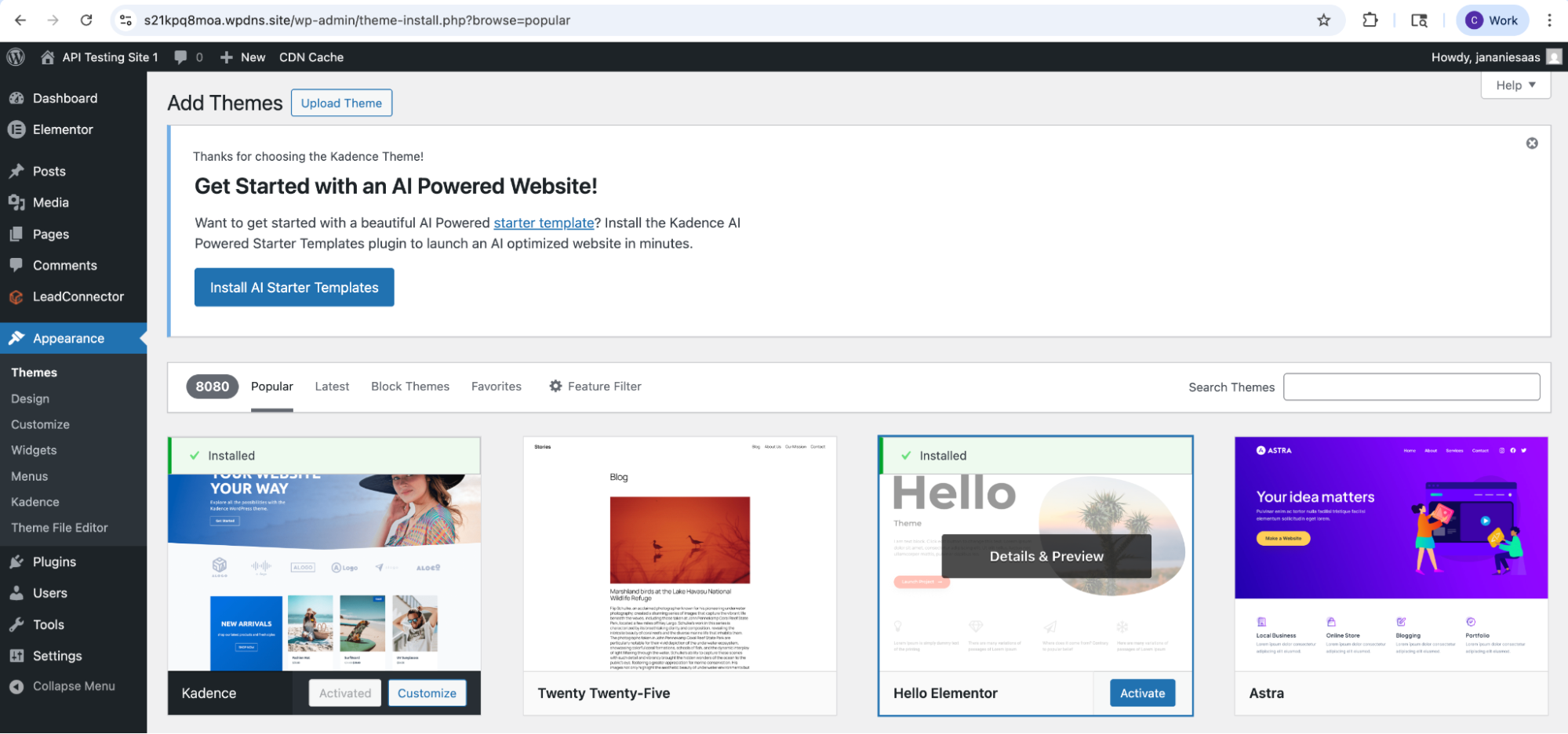
Once installation is complete, click “Activate.”
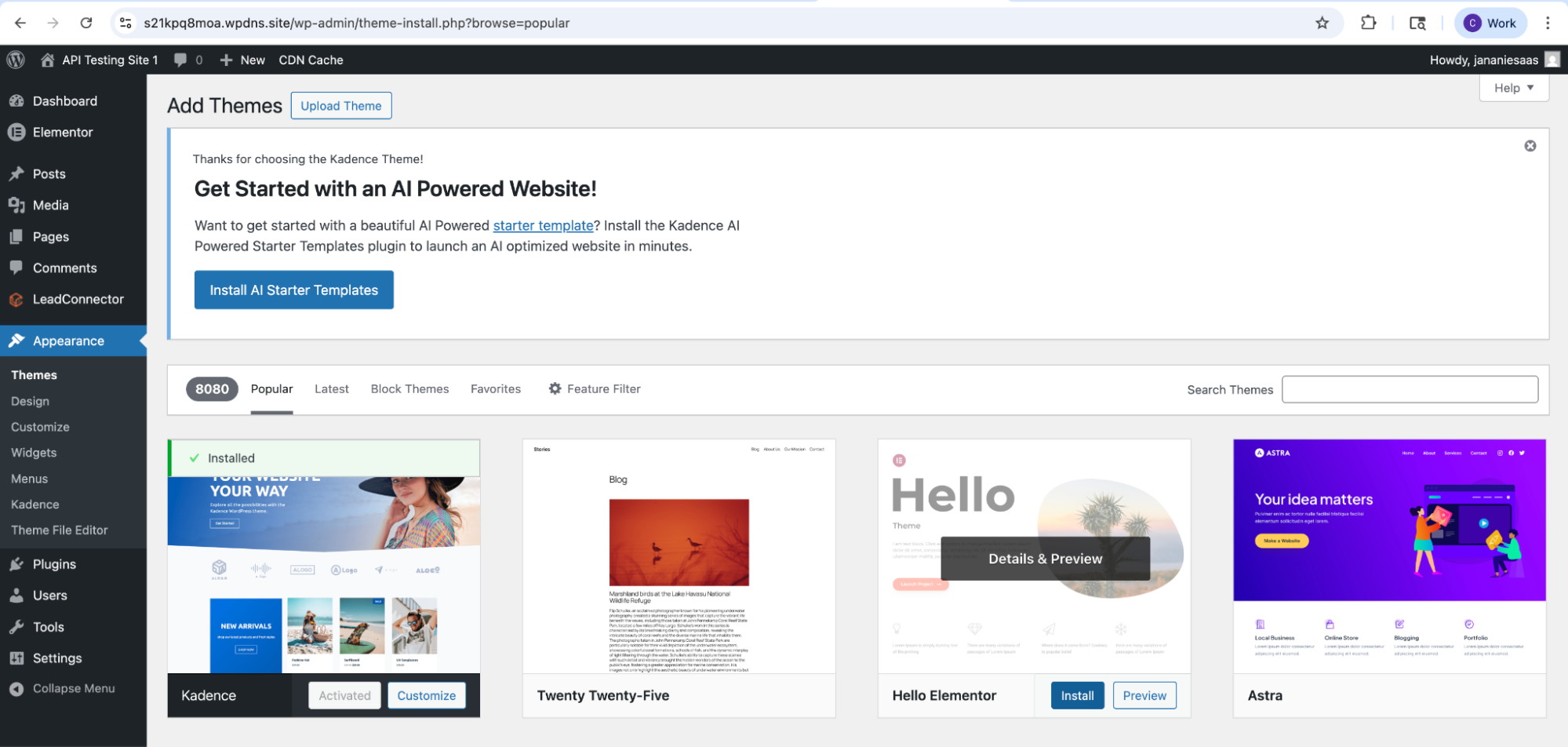
The selected theme is now successfully applied to your website.
2. Installing a Theme via ZIP Upload (Manual Method)
This method is used when installing themes obtained from external sources such as marketplaces or developer websites.
Procedure
Navigate to:
Appearance → Themes → Add ThemeClick “Upload Theme.”
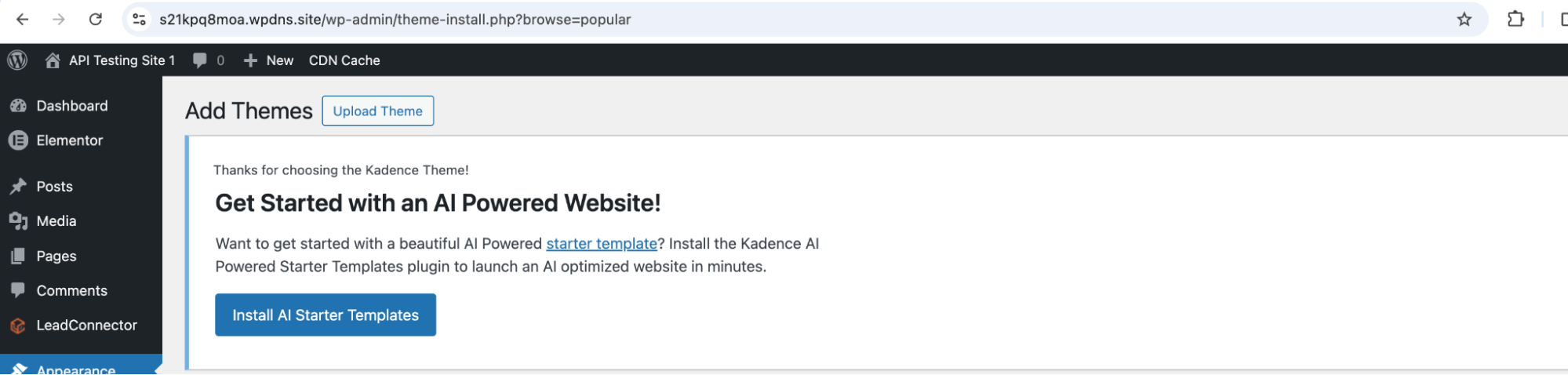
Select the theme file:
Click “Choose File”
Upload the
.zipfile containing the theme package
Click “Install Now” to begin installation.
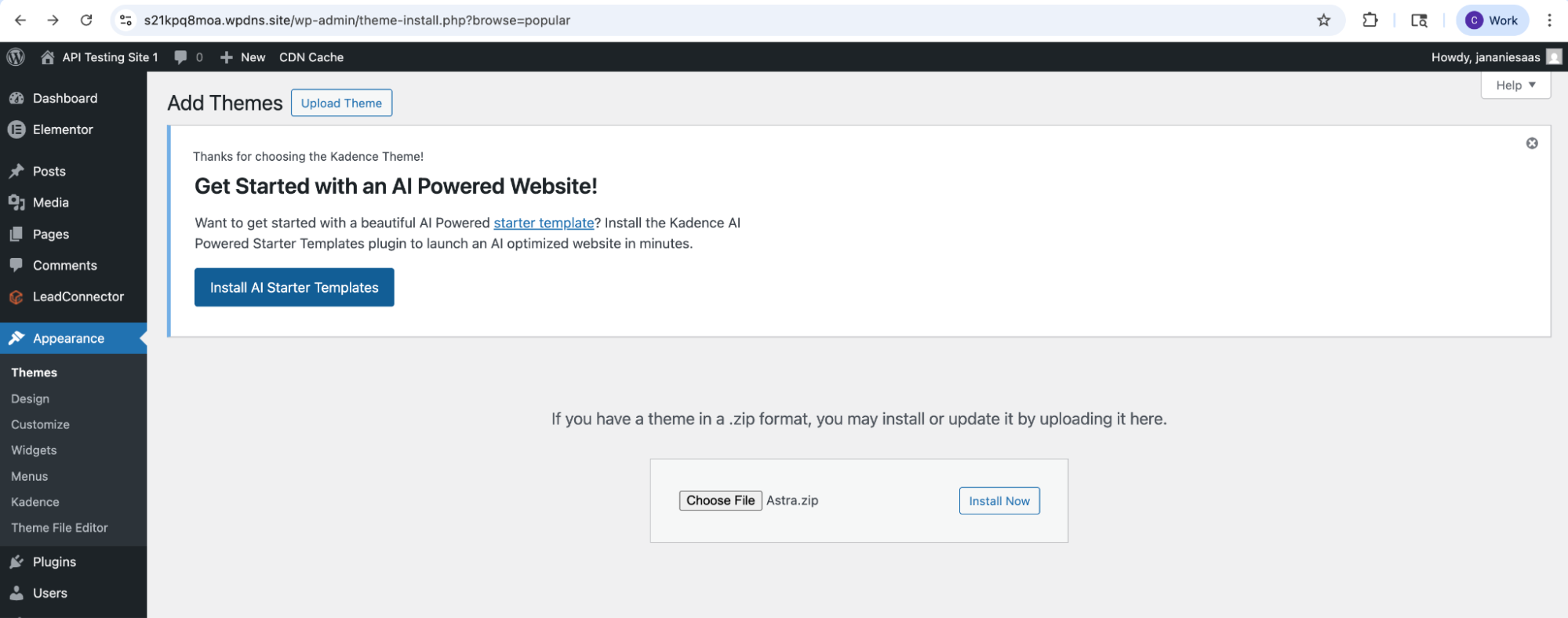
After installation completes, click “Activate.”
The selected theme is now successfully applied to your website.
1. Lightweight vs Feature-Rich Themes
WordPress themes differ significantly in architecture and performance characteristics.
Lightweight / Performance-Focused Themes
Astra
GeneratePress
Neve
Hello Elementor
These themes are designed with performance as a priority. They typically feature minimal CSS and JavaScript, reduced dependencies, and modular loading strategies that ensure only necessary assets are delivered.
Feature-Rich Themes
Hoot Porto
Newspaper
These themes provide extensive design capabilities, including pre-built layouts and advanced customization options. However, this functionality often introduces larger asset bundles and increased resource usage.
Even when certain features are not actively used, associated resources may still be loaded, contributing to slower performance.
Key Consideration
Feature-rich themes are not inherently inefficient, but they introduce a higher baseline cost. Their use should be aligned with actual project requirements.
2. Performance Pitfalls to Avoid
Selecting a theme without evaluating its performance characteristics can lead to long-term inefficiencies.
Common Pitfalls Include:
Prioritizing visual appeal over technical performance
Using feature-rich themes for simple implementations
Ignoring unused or redundant CSS and JavaScript
Failing to analyze asset loading behavior
Skipping performance validation prior to deployment
These issues tend to compound as the site evolves, making optimization increasingly complex.
3. Characteristics of a High-Performance Theme
A high-performance theme is defined by efficient resource management and optimized rendering.
Key Attributes Include:
Minimal CSS and JavaScript footprint
Limited reliance on external libraries
Reduced render-blocking resources
Efficient DOM structure
Modular and maintainable codebase
Themes that load excessive unused assets or rely heavily on blocking resources can negatively impact Core Web Vitals and user experience.
4. Theme Selection Process (Step-by-Step)
Choosing a WordPress theme is not just about looks. A good theme should also help your website run smoothly and load fast.
Step 1: Decide What Your Website Needs
Start by being clear about your purpose:
Blog, business website, or online store?
Do you need features like galleries, forms, or eCommerce?
Only pick what you actually need. Extra features you don’t use can slow down your site.
Step 2: Start with Simple, Fast Themes
If speed matters (which it usually does), begin with lightweight themes like:
GeneratePress
Astra
These are:
Fast
Easy to customize
Not overloaded with unnecessary features
Think of them as a clean base you can build on.
Step 3: Be Careful with Heavy (Feature-Rich) Themes
Themes like:
HootPorto
Newspaper
Come with many built-in features.
Use them only if you truly need those features.
Otherwise, they can:
Slow down your website
Make things harder to manage
Step 4: Check if the Theme Is Well Maintained
Before choosing a theme, quickly check:
Is it updated regularly?
Are there good user reviews?
Is support available if something breaks?
A well-maintained theme is safer and works better over time.
Step 5: Test How It Feels
If possible:
View the demo of the theme
Check how fast it loads
See if it feels smooth to use
If the demo feels slow, your site may feel slow too.
Choose a theme based on your needs—not just looks—to ensure a fast, efficient, and easy-to-manage website.
5. Theme Testing Methodology
A structured testing approach is essential for accurate performance evaluation.
Begin with a controlled environment, such as a staging or local setup, to isolate the theme’s impact. Use consistent content across all test scenarios to ensure comparability.
Performance analysis should be conducted using tools such as Lighthouse or PageSpeed Insights, focusing on:
Performance score
Load time
Page size
Unused CSS and JavaScript
Comparative testing provides valuable insights. For example, evaluating a lightweight theme such as Astra alongside a feature-rich theme like Porto or Newspaper typically reveals significant differences in resource utilization.
Detailed reports should also be reviewed to identify render-blocking resources, excessive DOM size, and high request counts.
Theme Performance Comparison
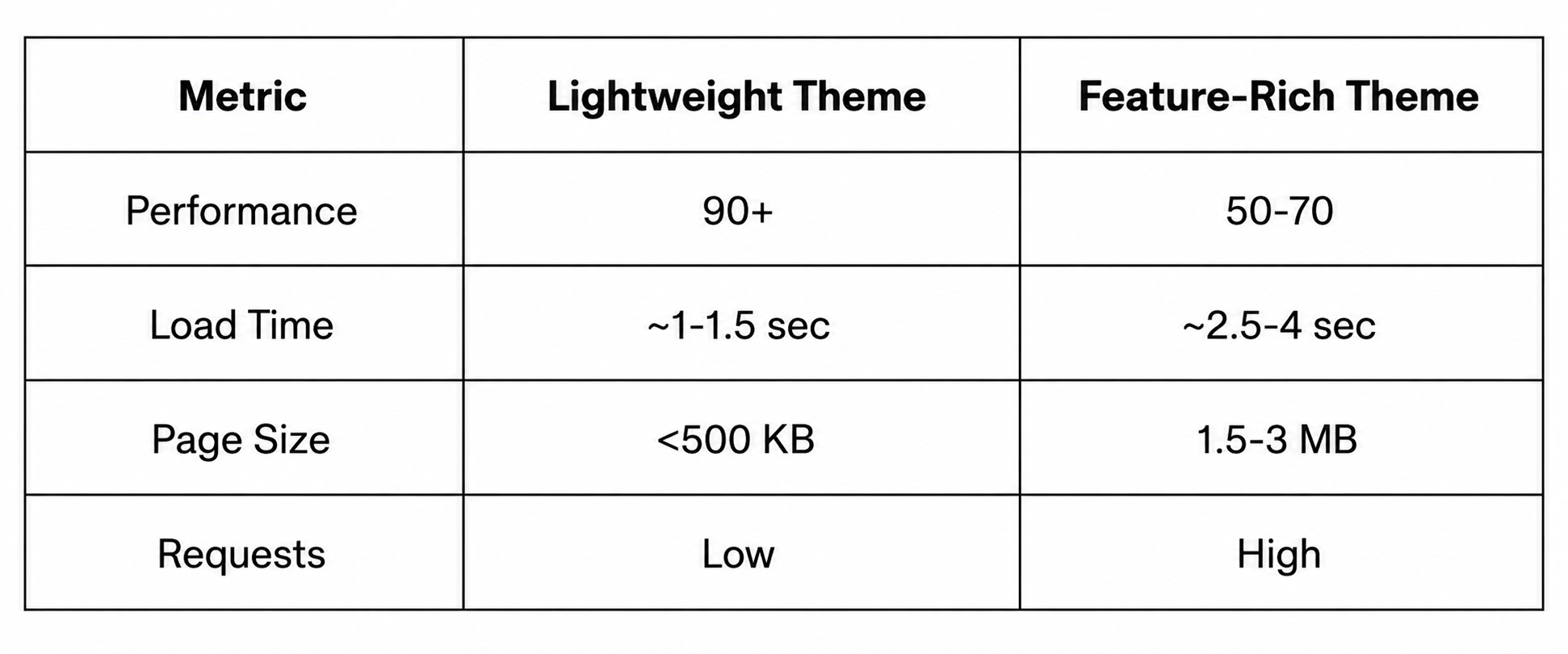
Theme architecture alone can create a significant difference in performance outcomes.
Real-World Example: Performance Impact
Consider a WordPress implementation using a feature-rich theme such as Porto. Even with minimal content, the theme may load multiple CSS and JavaScript assets, increasing page size and introducing render-blocking resources.
When the same layout is implemented using a lightweight theme, the number of requests and total asset size are significantly reduced. This leads to improved load times, faster rendering, and better Core Web Vitals.
This comparison demonstrates that theme selection has a measurable impact on performance, independent of other optimization efforts.
6. Final Action Plan
To ensure optimal performance:
Select a lightweight theme as the default approach
Use feature-rich themes only when their capabilities are required
Validate performance before deployment
Maintain a minimal and efficient design structure
Continuously monitor performance metrics
Conclusion
Theme selection is a foundational performance decision in WordPress.
An optimized theme provides a stable and efficient base for scaling, while an inefficient theme introduces structural overhead that is difficult to eliminate later.
High-performing websites are built on efficient foundations rather than relying on post-deployment optimizations.
Frequently Asked Questions
Q1: Are feature-rich themes always inefficient?
No. They are suitable for complex use cases but introduce higher baseline resource usage.
Q2: Which themes are preferred for performance?
Themes such as GeneratePress and Astra are widely recognized for their efficiency.
Q3: Can theme choice impact SEO?
Yes. Theme performance directly affects load time and Core Web Vitals, which influence search rankings.
Q4: What is the safest approach to theme selection?
Start with a lightweight theme and scale only when necessary.
Q5: What is the most common mistake?
Selecting a theme based on design rather than performance characteristics.
Ready to migrate your Wordpress site to HighLevel?.Learn more about GHL WordPress Hosting →


