
The Three Layers of AI in WordPress: What Belongs in Core, Platform and Plugins
WordPress 7.0 launched on May 20, 2026. Within 48 hours, security researchers had already documented a bug where browser autofill on the new AI Connectors screen could visually expose OpenAI and Anthropic API keys in the WordPress admin. Patchstack's CEO warned that the release would trigger an "absolute rush" to steal AI keys from compromised sites. A single high-usage key, left unattended, can rack up tens of thousands of dollars in charges before anyone notices.
This is not a story about a single bug. It is a story about where AI lives inside WordPress today, and why so much of it is in the wrong place.
WordPress now powers 42.2% of the web. That is roughly 590 million live sites. AI is being added to all of them at the same time, by core, by hosts, by page builders, by SEO plugins, by site owners installing their first AI assistant. Nobody has yet agreed on which of these things should do what. The result is a stack where the same job, calling a model, storing a key, paying a bill, gets done in four different places at once. That is the problem this post is about.
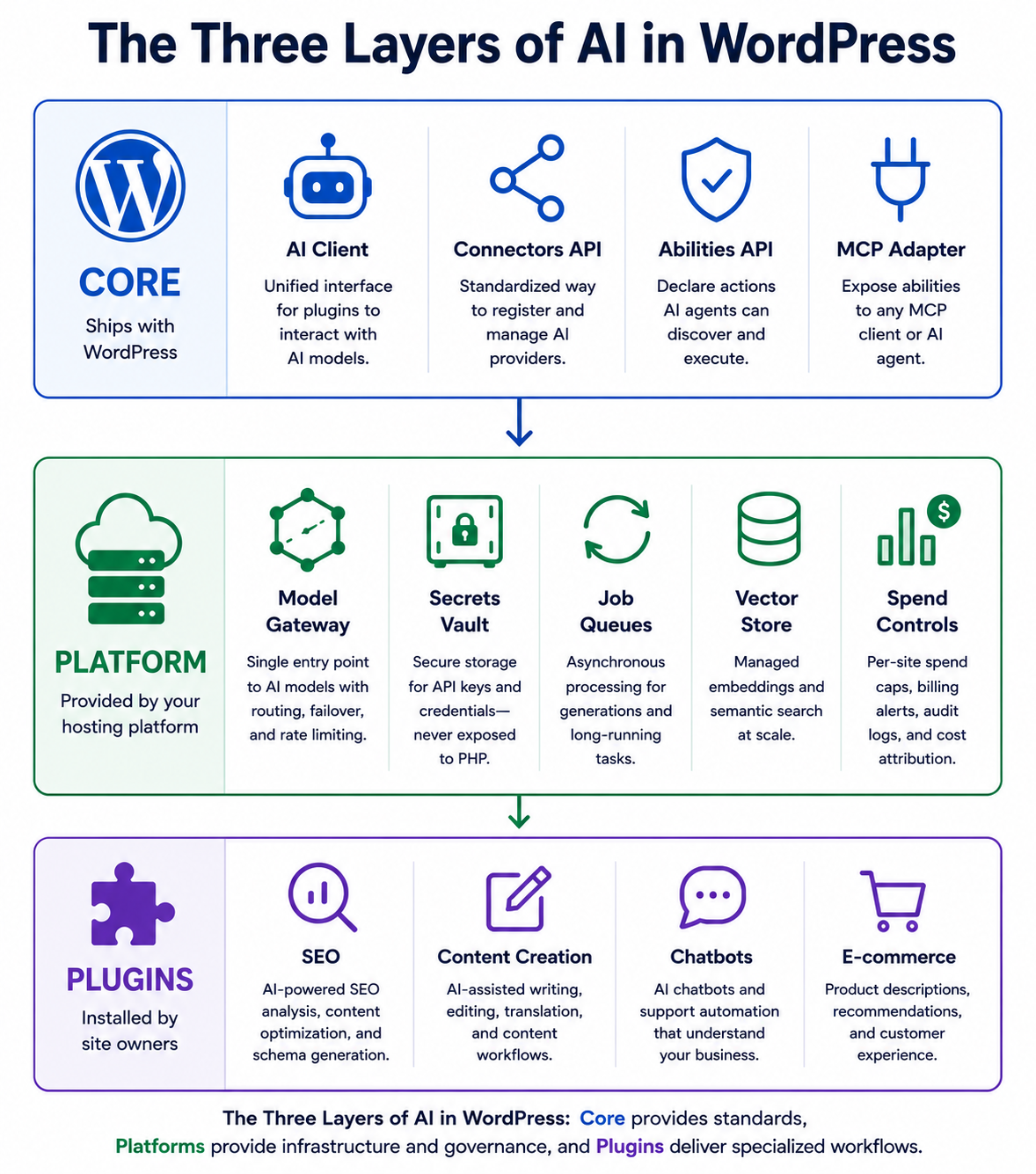
The simplest way to think clearly about AI in WordPress is to draw three layers and ask, for each AI feature, which layer it belongs to.
The three layers
Core is what ships with WordPress itself. The block editor. The REST API. The new AI Client introduced in WordPress 7.0. The Abilities API and the MCP Adapter that let AI agents discover and run site actions in a standard way. Core gives every WordPress site a shared vocabulary for AI.
Platform is your hosting layer. This is the part most people forget exists, because on shared hosting it does almost nothing. On a managed WordPress platform, this is where the heavy lifting should happen. Model routing. API key storage in a secrets vault, not the database. Per-site spend caps. Async job queues so generation runs in the background instead of holding a web request open. Caching of embeddings. Audit logs for every model call. Rate limiting before a runaway loop bills you for ten thousand requests.
Plugin is what site owners install on top. Rank Math for SEO copy. Spectra for AI-assisted block creation. AI Engine for content workflows. Tidio for AI chatbots. These plugins know your business; they know your tone of voice, your products, your support history. They are the right place for specialized AI workflows.
The thesis of this post is simple. Each of these layers does one job well. Trouble starts when one layer tries to do another layer's job. Most of the AI pain in WordPress today, including the API key theft risk that arrived with 7.0, comes from plugins being asked to do platform work that they were never designed to do.
What core does well
Core's job is primitives. Not models, not workflows, just the shared plumbing that everything else builds on.
The WP AI Client added in 7.0 is exactly the right kind of core feature. It gives plugins one consistent way to talk to a generative model, without each plugin shipping its own provider integration. The Connectors API standardizes how providers are registered. The Abilities API lets a plugin declare actions like "create a post" or "update SEO title" in a way that AI agents can discover and call. The MCP Adapter, an official package now under active development on github.com/WordPress/mcp-adapter, exposes those abilities to any MCP client.
This is good architecture. Core is not picking a model. Core is not storing money. Core is giving every plugin and every host a common interface so the layers above can do their jobs without reinventing the wheel.
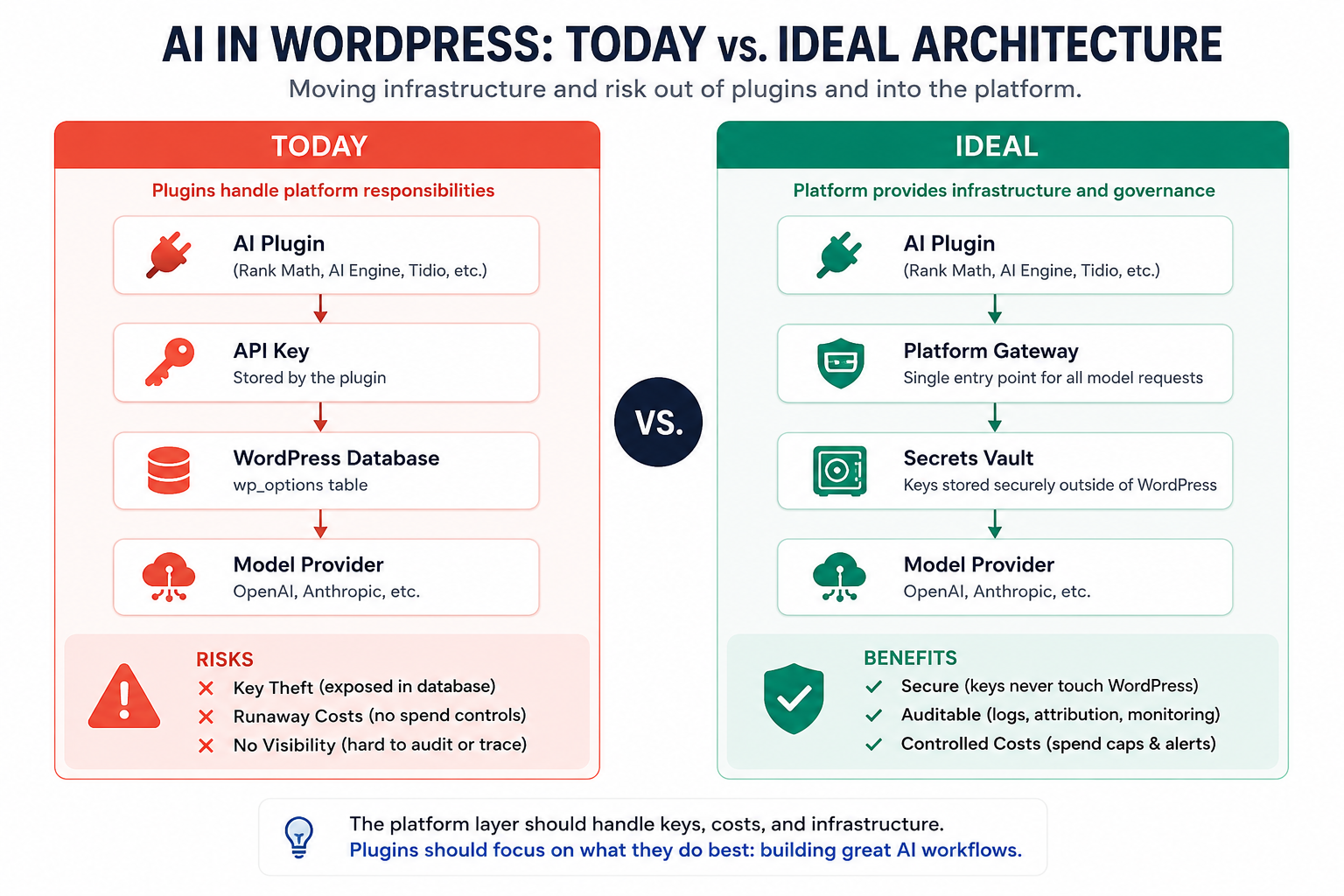
The Connectors screen in WordPress 7.0 sits in an awkward spot. API keys are entered through wp-admin and stored in the wp_options table. That table is where WordPress keeps post settings and theme options. It was never designed to store credentials worth thousands of dollars in API spend. Every SQL injection, every backup file, every plugin that reads options can potentially reach those keys.
To be fair to Core, this is not a careless choice. WordPress has a long-standing mandate to democratize publishing, which means every feature has to work on the lowest common denominator host: a single Linux box with PHP and MySQL, and nothing else. Core cannot assume a managed secrets vault, a platform gateway, or even a background job runner. If the Connectors screen required infrastructure that most hosts do not provide, the feature would not ship at all. So Core does what Core has always done. It ships the simplest thing that works everywhere, and it leaves the harder problem of where credentials should actually live to the layer above. That is exactly the case for a stronger platform layer, which is where this post goes next.
What plugins do well
Plugins are where specialized AI workflows belong, and where they are already producing real value.
Rank Math has over 3 million active installs and has built AI features directly into the SEO workflow. It knows what a focus keyword is, what schema fields matter, and what a meta description should look like. That domain knowledge is hard to bake into core and would be out of scope for a hosting platform. It belongs in the plugin.
Spectra, with over 1 million installs, has integrated its Zip AI library into the Gutenberg editing flow. AI Engine, the most installed independent AI plugin with more than 100,000 installs and a 4.9 star rating, gives content teams flexible AI workflows for blog posts, product descriptions, and translations. Tidio runs an AI chatbot that handles up to 70% of common support queries before a human ever sees them.
These are good plugins. They each understand a specific part of running a WordPress site that core cannot and a host cannot. The problem is not that they exist. The problem is what they are forced to do because the platform layer below them is mostly empty.
What the platform should do, but usually does not
On most WordPress hosts in 2026, the platform layer below your plugins is a Linux box with PHP and MySQL. Maybe a CDN in front. That was a reasonable platform for blogs in 2005. It is not a sufficient platform for the AI era.
Here is what a real AI-ready platform should provide, with the reason each one matters.
A managed model gateway is the most important. Instead of every plugin holding its own OpenAI or Anthropic API key inside the WordPress database, the platform holds one set of credentials in a real secrets vault, never visible to PHP. Plugins call the platform, and the platform calls the model provider. This single change removes the entire category of "stolen API key from wp_options" attacks. It also lets the platform negotiate better volume rates, pool requests across sites, and switch models without every plugin shipping an update.
Per-site spend caps and billing alerts. Without caps at the platform, a single buggy plugin loop, or a compromised account, can run up a five-figure OpenAI bill in a weekend. Patchstack and several independent researchers have already documented cases where attackers used stolen keys to power their own large-scale operations on someone else's account.
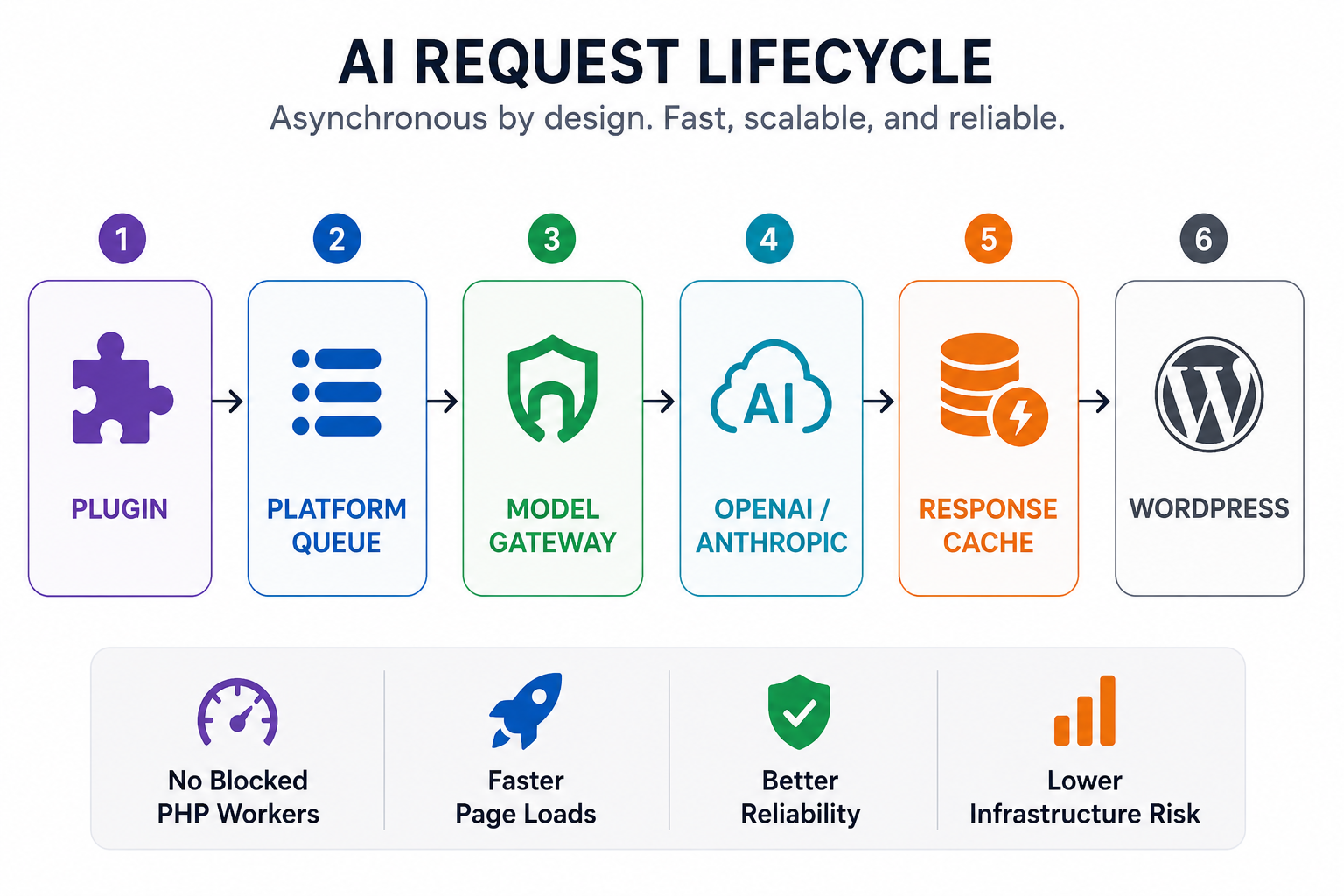
Async job queues for generation. This is where the WordPress PHP execution model collides with reality. A web request to WordPress runs synchronously. The PHP worker is held for the whole duration. A typical OpenAI completion takes between 800 milliseconds and three seconds. If a plugin makes that call inside a page render, your PHP worker is now held hostage for the full latency of the model. If the model API slows down, or fails, your site slows down or fails with it. Delicious Brains documented this exact pattern: a single slow external API can take down a WordPress site by holding all PHP-FPM workers in a synchronous queue. The platform fix is a job queue. Plugins enqueue a generation request. The queue runs it in the background. The user gets a status update through the REST API or a webhook. No web request ever waits on a model.
A vector store and embeddings service. Semantic search, related content, AI-assisted product discovery on WooCommerce stores. All of these depend on embeddings. Today, plugins like AI Vector Search and SemantiQ Search either run a local embedding model on the shared PHP host, which competes with the actual website for CPU, or call an external service like Qdrant or Supabase, which the site owner has to set up and maintain. A platform that ships a managed vector store removes that whole setup burden.
Audit logs and cost attribution. When three different plugins are making model calls and your monthly OpenAI bill jumps, you should be able to ask the platform exactly which plugin made which call, at what cost. Today, on most hosts, you cannot. The bill arrives, and you guess.
Rate limits and circuit breakers. If a model API starts failing, the platform should trip a circuit breaker so that one slow provider does not cascade into a site-wide outage. Today, this is the plugin author's responsibility, which means it is implemented sometimes, badly, and inconsistently across plugins.
Most managed WordPress hosts are not there yet. WP Engine's SSH gateway, designed for short maintenance sessions, times out after 10 minutes and is not suitable for persistent AI agent workflows. Kinsta keeps connections open and is closer to AI-ready on the infrastructure side, but neither host yet provides a managed AI gateway in the sense described above. Most other hosts are further behind.
It is worth being honest about why this is the case. Building a managed AI gateway, a secrets vault, a vector store, a job queue, and audit-grade observability is enterprise-grade infrastructure. It is expensive to build and expensive to run. Hosts that ship it will charge more than the five-dollar shared hosting plans that defined the last decade of WordPress. That is a real shift, and one the WordPress economy is going to have to come to terms with. The alternative, which is the situation most sites are in right now, is that every site owner still pays the cost. It just shows up as stolen keys, surprise model bills, and slow page loads instead of a line on the hosting invoice. The cost does not disappear; it moves.
Where it goes wrong when layers blur
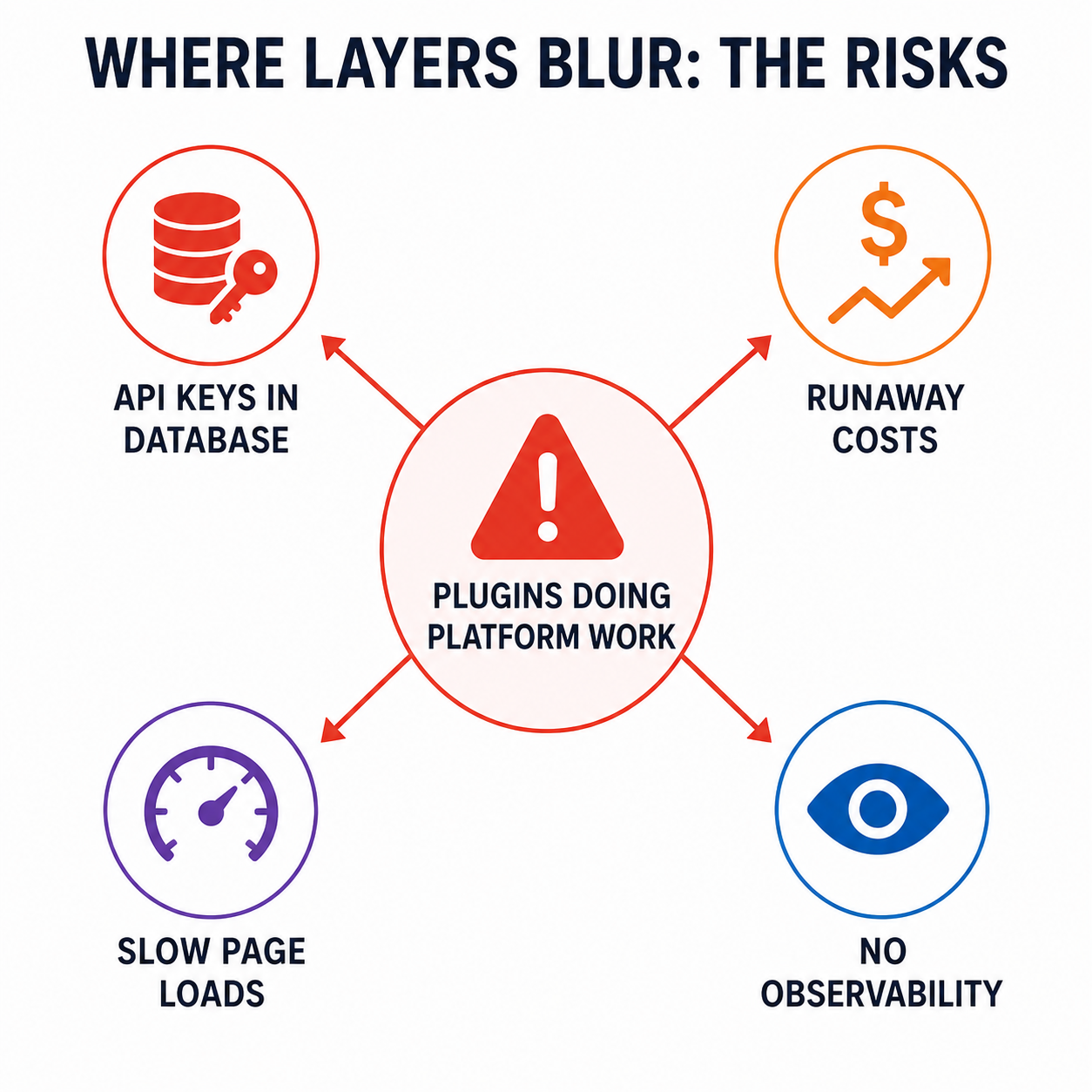
Almost every recent AI-related WordPress incident traces back to one root cause: a plugin doing the platform's job because the platform was empty.
API keys in the database. Because no platform provides a managed gateway, every AI plugin stores its own keys in wp_options. CVE-2026-2993 is an unauthenticated SQL injection in the AIWU plugin's getListForTbl function. CVSS score 9.3, critical range. No login required. Any attacker on the open internet can extract usernames, password hashes, and any AI API keys stored in that database. With WordPress 7.0 putting AI keys into the same table by default, the blast radius of every SQL injection just got bigger.
Runaway costs. Without a platform-level spend cap, a single buggy plugin loop, a misconfigured cron job, or a compromised key can drain a credit card before billing alerts catch up. There is no native WordPress concept of "this site is allowed to spend at most $50 a day on AI." There needs to be.
Synchronous calls inside page renders. When a plugin calls OpenAI inside a page render, every visitor on the site shares the latency cost. On a busy site, this is how a slow model API turns into a site-wide outage. The fix is not in the plugin, it is in the platform: an async job queue and a circuit breaker.
No observability. When five plugins each call models with their own keys, the site owner has no way to see what is happening. The OpenAI dashboard shows total usage, not which plugin caused which spike. The WordPress admin shows nothing. The bill is the first signal, which is the wrong place for the first signal to arrive.
None of these failures are the fault of any specific plugin author. They are the predictable consequence of an architecture where the only place to put AI logic is inside the plugin, because the platform is empty.
A practical checklist
If you are running a WordPress site in 2026, here is how to think about each piece of your AI stack. Treat this as the right questions to bring to the table, not pass-or-fail grades.
Where your API keys are stored, and how. Plaintext in wp_options is the worst case and the most common. Constants in wp-config.php (the AI Engine pattern) are meaningfully better. Whatever your setup, enable 2FA on every admin account, set billing alerts at the model provider, put a WAF in front of your site, use the permission-scoped key feature that OpenAI, Anthropic, and Google all now support, and rotate keys on a schedule.
Where AI generation happens. A model call inside a page render is a reliability bomb. For interactive features (chatbot replies, editor autocomplete), use streaming responses. For long-running generation, use a real background queue. WP Cron is not a real queue; it only runs on page loads and silently skips events on quiet sites. Use Action Scheduler, an external worker, or a host-provided queue. Cache outputs only when the input is deterministic. Set timeouts proportional to the user's expectation, not a fixed number.
How many plugins are making model calls, and through what. Each plugin that calls a model is its own keychain, cost centre, and bug surface. WordPress 7.0 ships a shared AI Client and Connectors API in core; prefer plugins that build against it. A plugin still shipping its own provider integration in mid-2026 is now a yellow flag.
Whether you can see what is happening. Observability is the silent gap in most WordPress AI stacks. When five plugins each make calls with their own keys, the only signal you get is the monthly bill. Look for plugins and hosts that expose per-call attribution: which plugin, which model, what cost.
Where your model calls physically land. Under GDPR, the California Consumer Privacy Act, or any data-localization rule, the region your call lands in matters as much as the model. OpenAI, Anthropic, and Google all offer regional inference endpoints in 2026, and not every plugin uses them. If your audience is in the EU and your AI plugin defaults to a US endpoint, that is a compliance conversation, not a performance one.
What your host actually provides, or is actively building. Ask, in plain language: do you offer managed AI credentials? Per-site spend caps? A job queue suitable for AI generation? A vector store or embeddings cache? The honest answer in mid-2026 is usually a mix of yes, no, and on the roadmap. A host that answers most of those with "no" and "not on the roadmap" is one where every AI feature you turn on is doing platform work inside your plugins.
How we are thinking about this at GoHighLevel
This architectural gap is not a theoretical problem. It is an infrastructure problem that hosting companies have to actively solve, by writing code, by hiring people, by signing contracts with model providers, and by accepting that the platform layer in 2027 will look very different from how it looked in 2025. So it feels fair to share how we are approaching it, rather than only critiquing the rest of the field.
Our previous post in this series, on the Plugin Tax, argued that anything which can run at the infrastructure layer should run at the infrastructure layer. Security, performance, observability, scaling. AI is the next item on that list and arguably the most consequential, because the cost of getting it wrong includes both an unbounded bill and a credential theft surface that did not exist a year ago.
The principles we are building toward for GoHighLevel WordPress are deliberately simple.
API keys never live in PHP. Credentials are held in a platform vault and used by a gateway service on the site's behalf. Every model call goes through that gateway. Every call is logged, attributed, and rate-limited. Spend caps are enforced at the platform, not on the honor system. Generation is async by default; the platform offers a job queue so plugins can fire and forget. Embeddings and vector search are platform services so each plugin does not have to wire up its own. Provider switching is a platform concern, not a plugin concern.
Some of this is shipping now. Some is on the roadmap. The point of writing this is not to claim we have solved it. The point is to be specific about what the right shape of a solution looks like, so site owners can ask the right questions of whoever they host with, including us.
The bottom line
WordPress just became an AI platform. Core gave us the primitives, and that part is going well. Plugins are doing what they should be doing, building specialized workflows on top. The gap is in the middle. The platform layer is mostly empty, and as long as it stays empty, every AI plugin you install will be quietly doing platform work it was never designed for, with the security and cost risks that follow.
The fix is not "use fewer plugins." The fix is "ask more of your platform."
If you remember one thing from this post, remember this. Plugins are appliances. Platforms are the wiring and the breaker panel. Core is the building code. Right now, too many WordPress sites are running a microwave that also has to be its own circuit breaker, its own electric meter, and its own utility company. That arrangement worked when the microwave only drew a few watts. AI is not a few watts.
It is time for the platform to do its job.
Get the best of WordPress and AI with HighLevel. Learn more about GHL WordPress Hosting →


